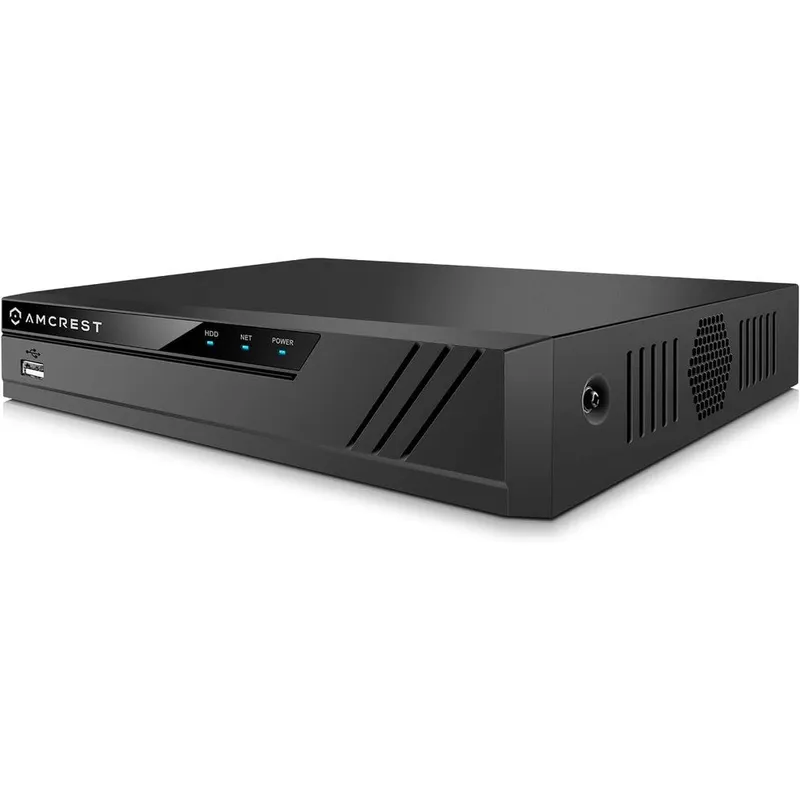
Amcrest 4K 16 Channel Network Video Recorder Ultra High Definition Security Camera NVR Supports Up To Ten Terabyte Hard Drive NV4116-A2
Why you'll like it
- Ultra High Definition Clarity — Supports full 4K eight megapixel recording and live viewing to capture every security detail precisely
- Advanced Storage Management — Employs H.265 compression technology to reduce bandwidth consumption and maximize hard drive space efficiency
- High Capacity Archiving — Features a SATA port that accommodates a hard drive up to ten terabytes for extensive video storage backup
- Seamless Remote Monitoring — Provides instant mobile access through the Amcrest View Pro app via a quick setup QR code scan
- Broad System Compatibility — Integrates smoothly with all Amcrest wired or wireless IP cameras alongside certified third-party ONVIF devices
Product details
Description
The Amcrest 4K 16-Channel Network Video Recorder (NV4116-A2) delivers premium surveillance capabilities for comprehensive property monitoring. Designed for both residential and commercial security setups, this robust NVR supports real-time recording and live viewing for up to sixteen IP cameras at crisp resolutions up to 8-Megapixel 4K.
With its maximum 80Mbps incoming bandwidth, it ensures smooth video feeds from all connected Amcrest and compatible third-party ONVIF devices. Utilizing advanced H.265 video compression technology, the recorder significantly optimizes bandwidth usage and saves valuable storage space, allowing for much longer recording retention.
It accommodates a single SATA hard drive with a massive capacity of up to ten terabytes, ensuring you have ample room for archives. Users can easily monitor their premises remotely via smartphones using the dedicated Amcrest View Pro application, which pairs quickly through a secure QR code setup.
This NVR requires a hardwired Ethernet connection to your internet router and operates efficiently via an external power supply, making it an ideal central hub for high-definition IP camera networks.
How to use
- Connect the Amcrest NVR to your internet router using the included Ethernet cable.
- Insert a compatible SATA hard drive up to ten terabytes inside the unit for storage.
- Plug in the DC 48V power supply and connect a monitor via HDMI or VGA.
- Turn on the system and use the included USB mouse to follow the on-screen startup wizard.
- Scan the QR code on the NVR chassis using the Amcrest View Pro application on your iOS or Android smartphone for remote monitoring setup.
Ingredients
Polycarbonate housing, steel internal chassis, multi-layered printed circuit boards, localized aluminum heat sinks, copper-wired internal port connectors, and integrated semiconductor chips.
As printed by the brand. Check the pack label if you have an allergy.
Specifications
| Brand | Amcrest |
|---|---|
| UPC | 085783534881 |
| Ships from | USA (sourced directly), checked in Navi Mumbai |
| Sold by | Dropy.in |
Ratings & reviews
From our customers
Top reviews first: highest rated, with photos first
- Jim R.5 ★
Straightforward, honest review, for IT pros and basic users.
Here is my honest rundown of this system.I bought the because my WD Readyview, which has been discontinued for years already, has no more remote functionality. I'm guessing Western Digital/Microcenter have shut down whatever service to provide access over devices. I bought this Amcrest (driveless) 16CH unit.I opened this gem up and installed a spare WD 6TB drive. DONE. I already have WD Readyview ONVIF cameras that were native to the previous system. Here's where I was concerned if they'd work. I was specific in looking for a new system with ONVIF compatibility. Without exaggeration, I plugged everything in, powered it on, followed some basic set up prompts, set a static IP (because I'm a nerd), and it sniffed my network and found all my existing cameras. I. Am. Not. Joking. I was actually sitting in front of my TV with my jaw dropped. Clicked done.. and I was D-O-N-E. It imported all my existing camera quality settings. Installed the app on my tablets and android phones, and it's done. This truly could not have been any easier. I'm an IT Engineer so I was expecting to get under the hood and start some voodoo configuring. It took longer for me to open the shipping and product boxes. AND the app even allows to view more than 4 cameras at a time as was the limitation of my previous system. A++++++++++++++++++++++++++
- Martin5 ★
Magnificent NVR for ONVIF cameras
It works great with Amcrest-branded IP cameras. I'm also using it with a Hikvision ONVIF IP camera, Dahua IP cameras, and an unbranded ONVIF doorbell camera from Nellys Security (NSC-DB2). The NVR itself is a lot smaller than it looks. The picture makes it seem like it's the size of a 1908's VCR, but it's much smaller than that. It is big enough for one HDD inside, and that's it. It integrates very well with the Android app "Amcrest View Pro." I especially like that it works in P2P mode with the Android app, which means you don't need to pay for a DNS service or do any port forwarding configuration with your router. It just works without any complex router setup. You can access the NVR for live video monitoring and/or playback anywhere you have an internet connection. The software in the NVR is pretty good. You have to configure cameras for it yourself, but it's not hard since it discovers IP cameras on your network. You just need to add the camera to the setup and enter its password, and you're done. One thing I didn't like was the noise from the case fan. I replaced the case fan with this: https://www.Dropy.com/dp/B071W93333?psc=1&ref=ppx_yo2ov_dt_b_product_details and even then it was a bit noisy, so then I added this somewhat pricy speed controller to reduce the fan speed by about 50%: https://www.Dropy.com/dp/B072M2HKSN?ref=ppx_yo2ov_dt_b_product_details&th=1 After that, the fan noise was reduced significantly. Not to zero, but quiet enough while still providing adequate air flow to cool the internals. Overall, I really like this NVR and highly recommend it.
- VellsMaster5 ★
A remarkably worthy 1st NVR or upgrade from an Eight camera unit
I purchased an Amcrest NV2108 HS NVR 1 1/2 years ago when the price was at a blow out special. I have a number of Amcrest cameras and was using the onboard email function from each to alert me when there was activity. Needless to say that got out of hand and called for a better solution. I wasn't expecting much, but I was very surprised with the feature set and reliability of the unit.I have since upgraded my cameras to higher resolution as well as added in a couple of non Amcrest cameras to the mix. The NV-2108 handled the additional load but was taking it's time on resolving live scene situations due to the increased bandwidth and processing.I did my research and selected the NV-4116HS as it met my criteria and utilized all of the external apps I currently use to access the cameras. I see this more as a server than a stand alone application. Setup was extremely easy as I transferred the config.back file from the NV-2108 to the new unit. The two ONVIF cameras integrated quickly, and my H.265 capable cameras aid with hard drive utilization. Tieing the NVR to the external apps was seamless as well. I now have nine cameras online and room to grow if the option arises.
- BOB B.4 ★
not to expectations, but it does the job
I have been building an Amcrest empire for many years now...its just not worth changing brands.I have 5 dome wifi cameras (mix of IP4M and IP3M models), 2 video door bells (AD410), and 1 outdoor camera (IP8M). I have Fios gigabit internet service.I decided I didn't want to pay for the Cloud Storage for the doorbells and outdoor camera any more so I got this NVR.My hope was to disable P2P on all cameras and run them through this NVR with P2P enabled so I would just access them remotely through the NVR with Amcrest View Pro.I suspect I would have had no problems if every camera I had was wired instead of wireless. But alas, thats impossible in my home. I had extreme difficulties with maintaining the cameras' connectivity with the NVR on my home network with my desired setup.My solution, that seems to be working for now, is keeping P2P enabled for the 5 cameras I don't need to record and not connecting them to my NVR. The 2 video doorbells and the outdoor camera are still connected to the NVR.So its a little awkward that I remotely access some cameras through the NVR and some not, but it seems to be stable, and I think I can cancel those cloud subscriptions.Maybe this will help someone.
FAQs
What is the maximum hard drive capacity supported by this NVR?
This Amcrest 16-channel network video recorder supports a single SATA hard drive with a maximum storage capacity of up to ten terabytes to handle extensive video recording histories.
Does this model feature built-in Power over Ethernet ports?
No, the NV4116-A2 model does not have built-in PoE ports. It requires a hardwired connection to your router, and your IP cameras must be powered via a separate PoE switch or independent power adapters.
Can I access my security footage remotely from my phone?
Yes, you can easily stream live video feeds and review recorded playback footage remotely by downloading the free Amcrest View Pro application on your smartphone and scanning the device's setup QR code.
Is this Amcrest network video recorder an authentic imported product available in India?
Yes, this is a 100% authentic Amcrest security product imported directly from the USA. Dropy India sources all personal care, health, and premium electronic tech directly from verified USA suppliers for genuine quality.
What comes included inside the product box?
The packaging contains one 16-Channel NVR unit, one DC 48V/2A power supply adapter, one USB mouse, one Ethernet network cable, a quick start guide, and the user manual.
How long will delivery take?
Most orders arrive in 15–20 days: we source each product directly from the USA, check it at our Navi Mumbai warehouse and pack it on video. Items marked Dropy Express ship from our India warehouse and arrive in 3–5 days.
Is cash on delivery available?
Full cash on delivery is available all over India on Dropy Express items. For other orders from ₹2,499 to ₹15,000 you can use Partial COD: pay 25% online now and the rest in cash on delivery.
Are your products genuine?
Yes. Every product is 100% authentic, sourced directly from the USA, quality-checked and packed on video at our Navi Mumbai warehouse.
What if my order arrives damaged or wrong?
Write to us at [email protected] as soon as it arrives. Damaged, wrong or not as described, our Buyer Protection gives you a full refund. The details are in our Return, Refund & Cancellation Policy.
Is delivery free?
Delivery is free on orders from ₹1,499. Below that a ₹79 delivery fee applies.