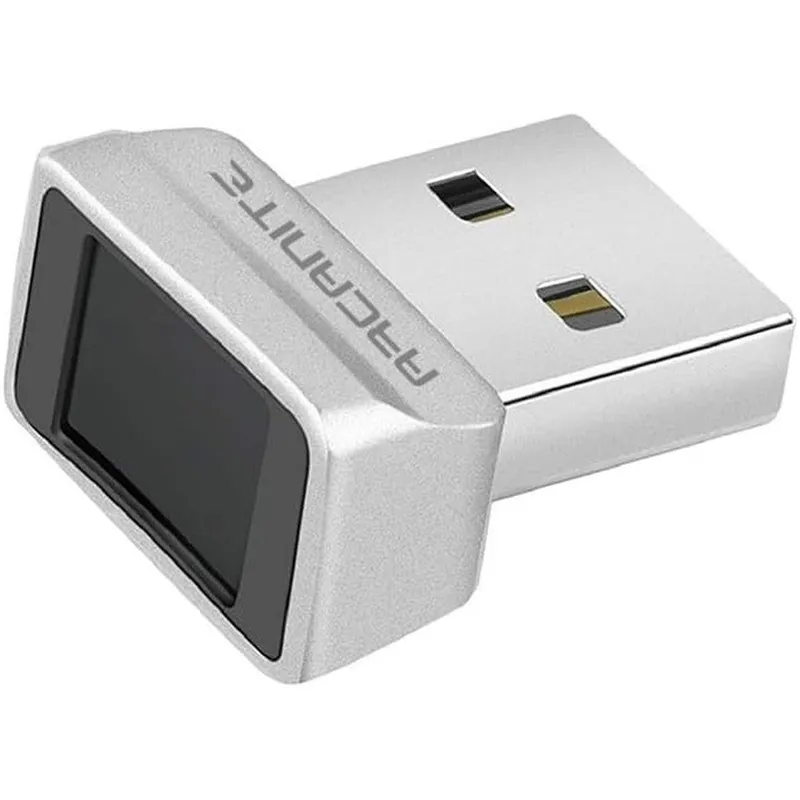
ARCANITE USB Fingerprint Reader for Windows 11 and 10 Hello Biometric Security Key for Desktop and Laptop Laptops
Why you'll like it
- Lightning Fast Authentication — Smart learning algorithm verifies your biometric data in just 0.05 seconds for instant access
- All Angle Access — Advanced 360-degree sensor accurately reads and detects fingerprints from any position or angle
- Multi User Flexibility — Parallel storage capability registers up to 10 unique fingerprint IDs simultaneously for shared systems
- Seamless Native Setup — Plug and play functionality integrates directly with standard Windows Hello settings without external software
Product details
Description
The ARCANITE USB Fingerprint Reader brings advanced biometric security directly to your Windows desktop or laptop PC. Designed to streamline your daily workflow, this compact security key eliminates the hassle of memorizing complex passwords by allowing you to log in with a single touch.
It is an ideal security solution for professionals, remote workers, and privacy-conscious users who want to protect sensitive digital data without sacrificing convenience. Featuring a high-performance 360-degree sensor, the device accurately reads your fingerprint from any angle for effortless access every single time.
It leverages a smart self-learning algorithm that accelerates authentication speed to an impressive 0.05 seconds while continually improving its recognition accuracy over time. Built with multi-user flexibility in mind, it securely stores up to 10 unique fingerprint IDs in parallel, making it perfect for shared family computers or collaborative office workstations.
Operating as a true plug-and-play device, it integrates natively with Windows Hello operating systems for swift setup without needing third-party software. Upgrade your personal cybersecurity setup with this imported, state-of-the-art biometric solution.
How to use
- Plug the biometric reader into an available USB Type-A port on your Windows 10 or Windows 11 computer.
- Open your PC settings menu, navigate to Accounts, and select Sign-in options.
- Locate the Windows Hello Fingerprint section and click Setup.
- Follow the on-screen prompts to register your fingerprint by repeatedly touching the sensor from various angles until registration is complete.
Ingredients
Polycarbonate housing, integrated biometric semiconductor sensor, gold-plated USB Type-A connector interface, built-in flash memory storage chip, self-learning microprocessor.
As printed by the brand. Check the pack label if you have an allergy.
Specifications
| Brand | ARCANITE |
|---|---|
| EAN | 4589879395340 |
| Ships from | USA (sourced directly), checked in Navi Mumbai |
| Sold by | Dropy.in |
Ratings & reviews
From our customers
FAQs
How to install fingerprint reader Windows 11?
Installation is seamless as the device features native plug-and-play functionality. Simply insert the reader into a USB port on your Windows 11 system, navigate to your account sign-in settings, and use the built-in Windows Hello setup assistant to register your biometrics.
Why is my fingerprint scanner not working with Windows Hello?
Ensure your computer is running an updated version of Windows 10 or Windows 11, as older operating systems like Windows 7 or macOS are not supported. If issues persist, check your device manager to verify that the system has automatically installed the proper biometric drivers.
Can multiple people use this fingerprint reader on a single computer?
Yes, the device supports parallel storage for up to 10 unique fingerprint profiles. This allows a single user to register multiple fingers for convenience, or multiple users to securely access their individual accounts on a shared machine.
Is this ARCANITE security device an authentic imported product available in India?
Yes, this is an authentic ARCANITE product imported directly from the USA. Dropy India ensures all personal care and tech gadgets are sourced genuinely from international channels to guarantee original performance and build quality.
Does this USB biometric scanner require any third-party software or apps?
No external software or third-party applications are required to operate this device. It is engineered to function natively using the secure cryptographic framework already built into your Windows operating system.
How long will delivery take?
Most orders arrive in 15–20 days: we source each product directly from the USA, check it at our Navi Mumbai warehouse and pack it on video. Items marked Dropy Express ship from our India warehouse and arrive in 3–5 days.
Is cash on delivery available?
Full cash on delivery is available all over India on Dropy Express items. For other orders from ₹2,499 to ₹15,000 you can use Partial COD: pay 25% online now and the rest in cash on delivery.
Are your products genuine?
Yes. Every product is 100% authentic, sourced directly from the USA, quality-checked and packed on video at our Navi Mumbai warehouse.
What if my order arrives damaged or wrong?
Write to us at [email protected] as soon as it arrives. Damaged, wrong or not as described, our Buyer Protection gives you a full refund. The details are in our Return, Refund & Cancellation Policy.
Is delivery free?
Delivery is free on orders from ₹1,499. Below that a ₹79 delivery fee applies.