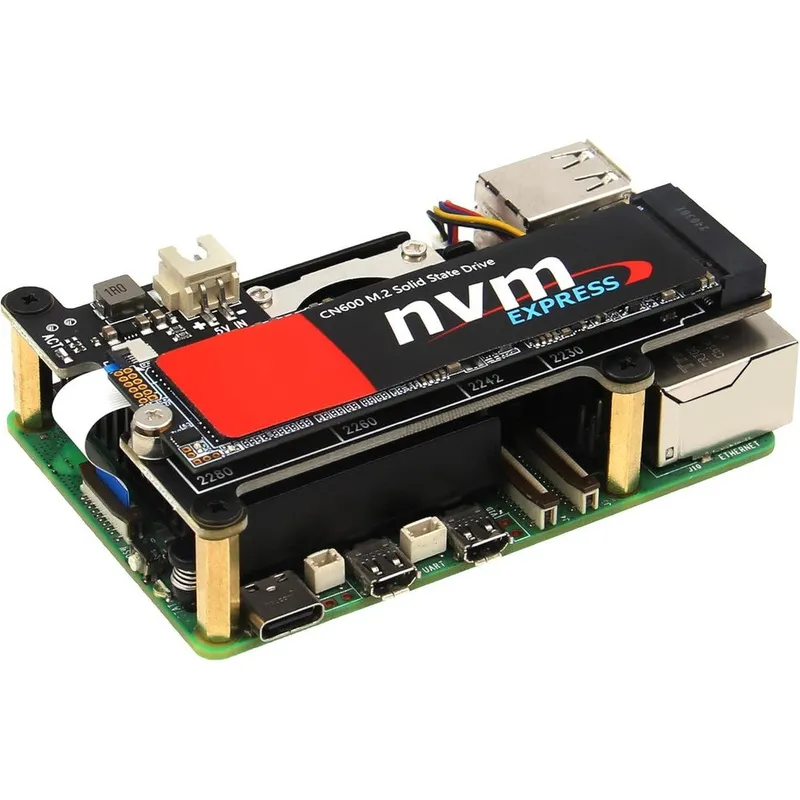
Geekworm X1001 PCIe to M.2 Key-M NVMe Solid State Drive Peripheral Expansion Board Peripheral Integration Protocol For Raspberry Pi 5
Why you'll like it
- Blazing Fast Performance — Connects to the native PCIe interface to enable ultra-fast operating system booting and rapid data transfers
- Broad Drive Compatibility — Supports Key-M NVMe solid state drives in standard lengths including 2230, 2242, 2260, and 2280
- Seamless Thermal Integration — Features a minimalist top-mounted design that allows effortless installation of the official active cooling fan
- Simplified Power Delivery — Draws energy directly from the flexible flat cable ribbon connection without requiring complex external wiring
- Real-Time Activity Monitoring — Includes an integrated activity light emitting diode indicator to provide immediate visual tracking of drive operations
Product details
Description
The Geekworm X1001 PCIe to M.2 Key-M NVMe Expansion Board is engineered specifically for tech enthusiasts, developers, and makers looking to elevate their Raspberry Pi 5 storage capabilities. By utilizing the single board computer's native PCIe interface, this peripheral board allows you to connect a high-speed M.2 solid state drive for blazing-fast data transfers and ultra-responsive operating system boot times.
It features a minimalist, hardware-optimized design that fits perfectly atop the single board computer, allowing seamless installation of the official active cooler to keep your setup running efficiently under heavy workloads. Ideal for building high-performance home servers, media centers, or advanced edge computing applications, this board eliminates standard MicroSD card bottlenecks.
It provides a reliable storage solution that accommodates multiple standard drive lengths, ensuring flexibility for your project needs while pulling power directly through the ribbon cable connection.
How to use
- Ensure your Raspberry Pi 5 is powered off and disconnected from any electrical source.
- Secure the copper pillars to the expansion board based on your drive length.
- Insert your compatible M.2 NVMe solid state drive into the Key-M slot and secure it with the provided hardware.
- Connect the short flexible flat ribbon cable to the PCIe port on the single board computer and the expansion board.
- Configure your operating system settings to enable the PCIe interface and set the solid state drive as the boot or storage volume.
Ingredients
High-grade copper spacers, multi-layer printed circuit board assembly, premium gold-plated M.2 Key-M slot connector, surface-mount components, and low-resistance flexible flat connector ribbon cable.
As printed by the brand. Check the pack label if you have an allergy.
Specifications
| Brand | Geekworm |
|---|---|
| Ships from | USA (sourced directly), checked in Navi Mumbai |
| Sold by | Dropy.in |
Ratings & reviews
From our customers
FAQs
How to Install the X1001 Pcie M.2 Key-M NVMe SSD Board with P579 Case for Raspberry Pi 5?
Mount the board onto the single board computer using the provided brass standoffs while ensuring the flexible flat cable is securely aligned. Slide the assembled unit carefully into the metal case tracks, ensuring all port cutouts are aligned perfectly before securing the outer shell screws.
What power adapter is recommended when using this expansion board?
It is highly recommended to use the official Power Delivery twenty-seven watt power adapter. This ensures both the single board computer and the attached solid state drive receive stable, sufficient current during intensive write operations.
Does this board support standard solid state drive sizes?
Yes, it is designed with adjustable hardware mounting points. It fully supports standard lengths including twenty-two thirty, twenty-two forty-two, twenty-two sixty, and twenty-two eighty variants.
Is this product an authentic import available for delivery in India?
Yes, this is an authentic product sourced directly from premium global channels. Dropy ensures genuine imports reach tech enthusiasts across India with reliable local handling.
Can I use this board with older single board computer models?
No, this expansion board is strictly designed for the architecture of the newer version five model. It relies on the specific PCIe interface placement that is not present on older legacy boards.
How long will delivery take?
Most orders arrive in 15–20 days: we source each product directly from the USA, check it at our Navi Mumbai warehouse and pack it on video. Items marked Dropy Express ship from our India warehouse and arrive in 3–5 days.
Is cash on delivery available?
Full cash on delivery is available all over India on Dropy Express items. For other orders from ₹2,499 to ₹15,000 you can use Partial COD: pay 25% online now and the rest in cash on delivery.
Are your products genuine?
Yes. Every product is 100% authentic, sourced directly from the USA, quality-checked and packed on video at our Navi Mumbai warehouse.
What if my order arrives damaged or wrong?
Write to us at [email protected] as soon as it arrives. Damaged, wrong or not as described, our Buyer Protection gives you a full refund. The details are in our Return, Refund & Cancellation Policy.
Is delivery free?
Delivery is free on orders from ₹1,499. Below that a ₹79 delivery fee applies.