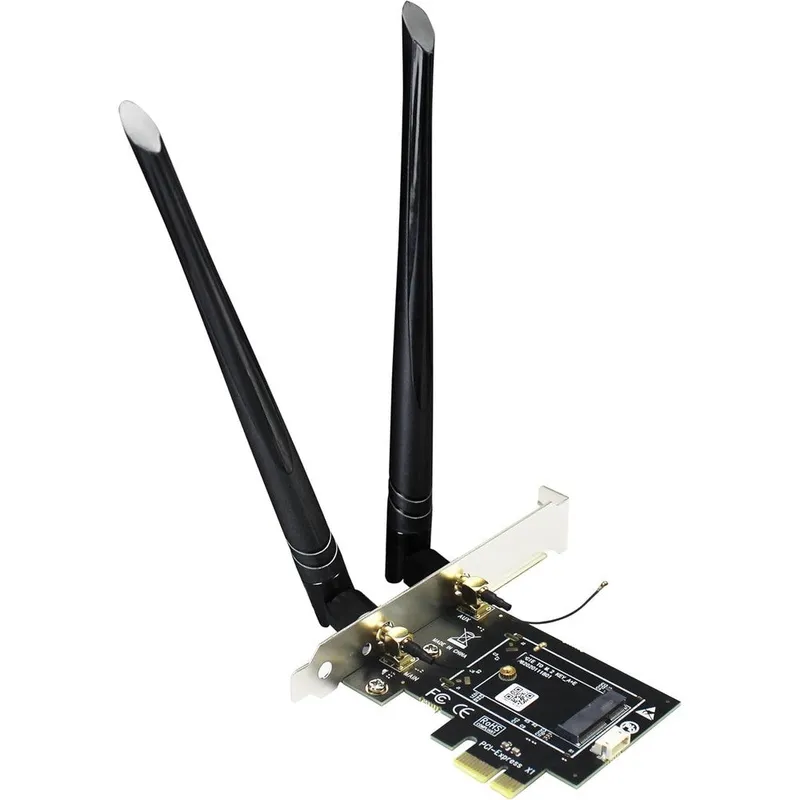
GLOTRENDS WA01 M.2 E Key to PCI-Express X1 Desktop Wireless WiFi and Bluetooth Passive Adapter Card with Six dBi SMA Antenna Kit Black
Why you'll like it
- Desktop Wireless Upgrade — Converts laptop M.2 network modules into a desktop compatible PCI-Express X1 interface
- Multi-Generation Compatibility — Supports any standard M.2 Key E or A plus E wireless card from WiFi 4 up to next-generation WiFi 7
- Stable Bluetooth Functionality — Includes a dedicated motherboard USB header cable to power integrated Bluetooth signals seamlessly
- Enhanced Signal Coverage — Features dual high-gain six dBi external SMA antennas to maximize range and minimize dead zones
- Hardware Accelerator Ready — Formatted to support edge computing setups by accepting a Coral TPU M.2 module perfectly
Product details
Description
The GLOTRENDS WA01 is a premium passive adapter card engineered for desktop users looking to upgrade their wireless connectivity. This adapter allows you to seamlessly install an M.2 NGFF Key E or A plus E wireless module, such as advanced WiFi 7, 6E, 6, 5, or 4 network cards, into a standard PCI-Express X1 slot on your motherboard.
Beyond network modules, it also extends full compatibility to the Coral M.2 Accelerator TPU module, making it an excellent choice for tech enthusiasts and custom PC builders alike. The adapter splits signals efficiently, routing high-speed WiFi data through the PCIe interface while utilizing a dedicated internal USB connection to enable stable Bluetooth functionality.
Equipped with dual external high-gain six dBi SMA antennas, it ensures robust signal reception and expansive range across triple-band frequencies. It requires zero drivers for the adapter itself, offering a straightforward hardware conversion kit that includes all necessary mounting screws and cables for a clean installation.
How to use
- Ensure your desktop PC is powered off and unplugged.
- Insert your chosen M.2 WiFi or Coral TPU module into the adapter slot and secure it with the included screw.
- Connect the provided USB cable from the adapter card to an open nine-pin USB header on your motherboard to enable Bluetooth.
- Insert the adapter assembly firmly into an available PCI-Express X1, X4, X8, or X16 slot on your motherboard.
- Secure the rear bracket to your PC chassis, screw the two external SMA antennas onto the rear ports, boot up your computer, and install the specific drivers required for your actual wireless module.
Ingredients
High-grade fiberglass epoxy resin printed circuit board, gold-plated PCI-Express X1 contacts, premium copper-core SMA antenna connectors, shielded internal USB data cable, metal mounting bracket, and stainless steel assembly screws.
As printed by the brand. Check the pack label if you have an allergy.
Specifications
| Brand | GLOTRENDS |
|---|---|
| Ships from | USA (sourced directly), checked in Navi Mumbai |
| Sold by | Dropy.in |
Ratings & reviews
From our customers
FAQs
Why won't the adapter card fit into my motherboard slot?
This adapter is designed for standard desktop PCI-Express slots, including X1, X4, X8, and X16 variations. Ensure you are not attempting to force it into an older legacy PCI slot or a standard M.2 storage slot, as the physical alignment and pin configurations are completely different.
Does this adapter card include a built-in wireless network chip?
No, this is a passive converter board only and does not contain an onboard wireless chipset. You must purchase and install a separate compatible M.2 NGFF wireless network card or Coral module to enable actual WiFi and Bluetooth functionality.
Why is my WiFi working perfectly but the Bluetooth is not detected?
Bluetooth data cannot travel through the PCI-Express lane alone on passive adapters. To fix this, you must connect the included internal USB cable from the adapter card to a functional nine-pin USB header on your desktop motherboard.
Is this GLOTRENDS adapter an authentic imported product available in India?
Yes, this is a genuine GLOTRENDS product imported directly from the USA. Dropy India sources these products directly from authorized distributors overseas to guarantee authentic quality for Indian PC builders and enthusiasts.
Does this adapter card require separate drivers to function?
The hardware adapter itself is entirely passive and requires no drivers or software setup. However, your operating system will require the specific official drivers for whatever individual M.2 WiFi card you choose to install inside it.
How long will delivery take?
Most orders arrive in 15–20 days: we source each product directly from the USA, check it at our Navi Mumbai warehouse and pack it on video. Items marked Dropy Express ship from our India warehouse and arrive in 3–5 days.
Is cash on delivery available?
Full cash on delivery is available all over India on Dropy Express items. For other orders from ₹2,499 to ₹15,000 you can use Partial COD: pay 25% online now and the rest in cash on delivery.
Are your products genuine?
Yes. Every product is 100% authentic, sourced directly from the USA, quality-checked and packed on video at our Navi Mumbai warehouse.
What if my order arrives damaged or wrong?
Write to us at [email protected] as soon as it arrives. Damaged, wrong or not as described, our Buyer Protection gives you a full refund. The details are in our Return, Refund & Cancellation Policy.
Is delivery free?
Delivery is free on orders from ₹1,499. Below that a ₹79 delivery fee applies.