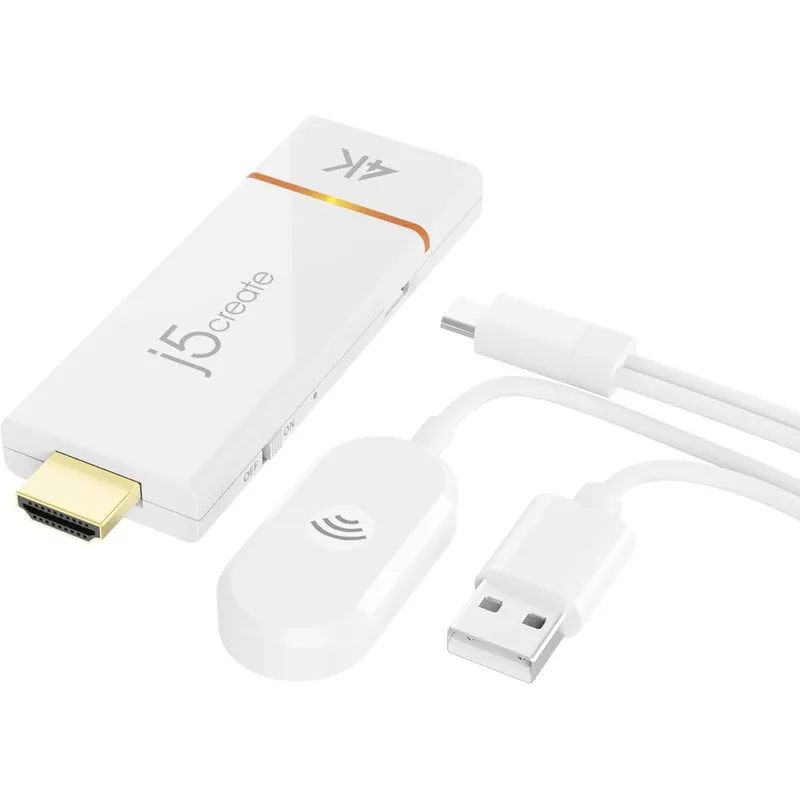
j5create ScreenCast 4K Wireless Display Adapter Dual Band Screen Mirroring And Extension For Windows MacOS Android And iOS
Why you'll like it
- Universal Cross Platform Compatibility — Supports AirPlay, Miracast, and Chromecast standards natively to seamlessly mirror or extend Windows, macOS, iOS, and Android devices
- Stunning 4K Ultra HD Visuals — Delivers upscaled 4K high resolution streaming at 30Hz for clear presentations, crisp documents, and cinematic movie viewing
- Extended Wireless Range — Features a dedicated external antenna that provides stable, lag-free signal coverage up to 50 feet or 15 meters in open environments
- Secure Presentation Experience — Offers customizable backgrounds and secure PIN code functions exclusively for Miracast connections to prevent unauthorized screen sharing
Product details
Description
The j5create ScreenCast 4K Wireless Display Adapter transforms your standard television or monitor into an advanced, intelligent display. Designed for professionals, educators, and home entertainment enthusiasts, this plug-and-play streaming dongle allows you to effortlessly mirror or extend your screen from smartphones, tablets, and laptops without the hassle of messy cables or external applications.
It delivers crisp, upscaled 4K Ultra High Definition visuals at 30Hz, ensuring that your movies, presentations, and applications look exceptionally sharp. Equipped with a high-performance external antenna, this wireless adapter provides robust and reliable signal coverage up to 50 feet away in open spaces.
It natively supports cross-platform wireless display standards including AirPlay, Miracast, and Google Chromecast, making it universally compatible with Windows, macOS, iOS, and Android systems. Whether you are delivering a corporate presentation or streaming content at home, it offers a stable, secure, and high-quality casting experience.
How to use
- Plug the HDMI connector of the ScreenCast adapter into an available HDMI port on your TV or monitor.
- Connect the attached USB cable to a powered USB port or a standard wall adapter.
- Turn on your display and select the corresponding HDMI input source to view the setup screen.
- Use your device's native wireless display functionality, such as AirPlay on Apple devices, Smart View on Android, or the Windows plus K shortcut on laptops, to select the adapter and begin casting.
Ingredients
Polycarbonate and ABS plastic housing, integrated HDMI male connector, external high-gain dual-band antenna module, multi-protocol wireless casting chipset, USB power cable assembly.
As printed by the brand. Check the pack label if you have an allergy.
Specifications
| Brand | j5create |
|---|---|
| UPC | 847626005695 |
| Ships from | USA (sourced directly), checked in Navi Mumbai |
| Sold by | Dropy.in |
Ratings & reviews
From our customers
FAQs
What is the j5create ScreenCast wireless display adapter?
It is a plug-and-play casting device that plugs into your television or monitor's HDMI port, allowing you to wirelessly mirror or extend the screen of your mobile phone, tablet, or laptop without needing a local Wi-Fi network or extra apps.
How to use J5Create ScreenCast 4K Wireless Display Adapter?
Connect the adapter to your television's HDMI port and power it via a USB port. Then, open your device's built-in screen-sharing protocol, such as AirPlay, Miracast, or Chromecast, and choose the adapter from the list to display your screen wirelessly.
What is the password for j5 ScreenCast?
The default password or security PIN code is dynamically displayed on the main setup screen of your TV when you boot up the adapter. You can enter this sequence on your casting device to establish a secure link.
Is this j5create ScreenCast 4K Wireless Adapter authentic and available in India?
Yes, this is a 100 percent authentic j5create product imported directly from the USA. Dropy India sources all personal care, health, and premium tech accessories directly from genuine distributors in the USA to guarantee absolute authenticity for Indian consumers.
Does this adapter require a third-party app to work?
No, it does not require any external applications. It relies completely on the native wireless casting features already built into your Windows, macOS, iOS, or Android operating systems.
How long will delivery take?
Most orders arrive in 15–20 days: we source each product directly from the USA, check it at our Navi Mumbai warehouse and pack it on video. Items marked Dropy Express ship from our India warehouse and arrive in 3–5 days.
Is cash on delivery available?
Full cash on delivery is available all over India on Dropy Express items. For other orders from ₹2,499 to ₹15,000 you can use Partial COD: pay 25% online now and the rest in cash on delivery.
Are your products genuine?
Yes. Every product is 100% authentic, sourced directly from the USA, quality-checked and packed on video at our Navi Mumbai warehouse.
What if my order arrives damaged or wrong?
Write to us at [email protected] as soon as it arrives. Damaged, wrong or not as described, our Buyer Protection gives you a full refund. The details are in our Return, Refund & Cancellation Policy.
Is delivery free?
Delivery is free on orders from ₹1,499. Below that a ₹79 delivery fee applies.