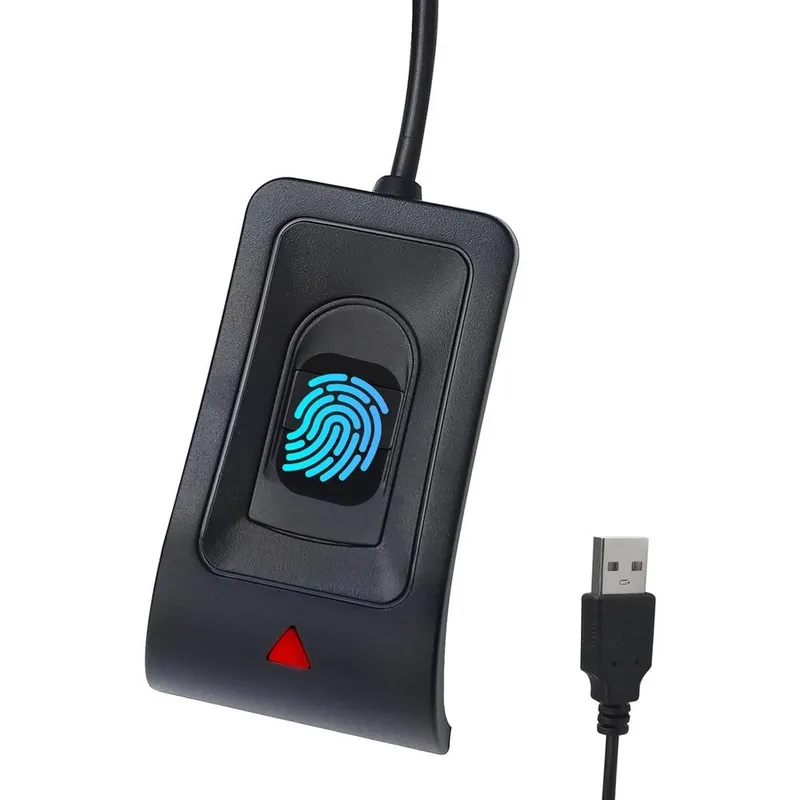
Jian Boland USB Fingerprint Reader For Windows 10 And 11 With Windows Hello Password Free Login And 5 Foot Extension Cable
Why you'll like it
- Enhanced Security — Utilize Microsoft Windows Hello for password-free, biometric access to your computer
- Quick Access — Experience fast and reliable authentication with recognition speeds under 0.5 seconds
- Versatile Usage — Store up to 10 distinct fingerprints to support multiple users on a single PC
- Flexible Placement — Includes a 5-foot extension cable to ensure the scanner is always within easy reach
- Simple Setup — Benefit from plug-and-play functionality that installs drivers automatically on most systems
Product details
Description
Upgrade your computer security with the Jian Boland USB Fingerprint Reader, designed for seamless integration with Windows Hello on Windows 10 and 11 systems. This compact biometric scanner eliminates the need to remember complex usernames and passwords, allowing for fast, secure, and convenient access to your desktop or laptop.
Featuring advanced capacitive touch technology, it offers 360-degree finger recognition with a lightning-fast response time of less than 0.5 seconds. The device supports storing up to 10 unique fingerprints, making it an excellent solution for shared workstations or family PCs where multiple users require individualized access.
Engineered for convenience, the unit features a plug-and-play design with automatic driver installation, ensuring it is ready to use immediately upon connection. It includes a generous 5-foot extension cable, providing the flexibility needed to position the reader comfortably on any desk setup.
With a focus on accuracy, the scanner maintains industry-leading low false acceptance and rejection rates, ensuring your data remains protected. Whether you are using a desktop, laptop, or all-in-one computer, this fingerprint reader provides a professional and efficient upgrade to your daily login routine.
How to use
- Plug the USB Fingerprint Reader into an available USB port on your Windows 10 or 11 computer.
- The system should automatically recognize the device and install the necessary drivers.
- Once connected, navigate to Windows Settings > Accounts > Sign-in options and select 'Fingerprint recognition (Windows Hello)' to begin registering your fingerprints following the on-screen prompts.
- If the device is not immediately recognized, ensure your system is connected to the internet to allow for automatic driver updates.
Ingredients
High-grade metal casing, capacitive biometric sensor array, copper-core USB cabling, ABS plastic internal housing, and high-speed CMOS image sensor.
As printed by the brand. Check the pack label if you have an allergy.
Specifications
| Brand | JIAN BOLAND |
|---|---|
| GTIN | 00717664826555 |
| Ships from | USA (sourced directly), checked in Navi Mumbai |
| Sold by | Dropy.in |
Ratings & reviews
From our customers
FAQs
Is this fingerprint reader compatible with both Windows 10 and Windows 11?
Yes, this device is fully compatible with both Windows 10 and Windows 11 operating systems in both 32-bit and 64-bit versions, supporting the built-in Windows Hello biometric framework.
How many users can register their fingerprints on this device?
The scanner supports up to 10 different fingerprints, making it ideal for managing access on a shared family computer or an office workstation.
Does this require any external software installation?
No, it features plug-and-play functionality with automatic driver installation. In most cases, Windows will recognize and configure the device immediately upon connection.
Are the products sold on Dropy authentic imports?
Yes, all products available at Dropy are authentic, premium items sourced directly from the USA to ensure you receive genuine quality and performance.
What should I do if the device is not recognized by my computer?
If the device is not recognized, ensure your computer is connected to the internet and attempt a system restart. You can also manually update the driver through the Windows Device Manager.
How long will delivery take?
Most orders arrive in 15–20 days: we source each product directly from the USA, check it at our Navi Mumbai warehouse and pack it on video. Items marked Dropy Express ship from our India warehouse and arrive in 3–5 days.
Is cash on delivery available?
Full cash on delivery is available all over India on Dropy Express items. For other orders from ₹2,499 to ₹15,000 you can use Partial COD: pay 25% online now and the rest in cash on delivery.
Are your products genuine?
Yes. Every product is 100% authentic, sourced directly from the USA, quality-checked and packed on video at our Navi Mumbai warehouse.
What if my order arrives damaged or wrong?
Write to us at [email protected] as soon as it arrives. Damaged, wrong or not as described, our Buyer Protection gives you a full refund. The details are in our Return, Refund & Cancellation Policy.
Is delivery free?
Delivery is free on orders from ₹1,499. Below that a ₹79 delivery fee applies.