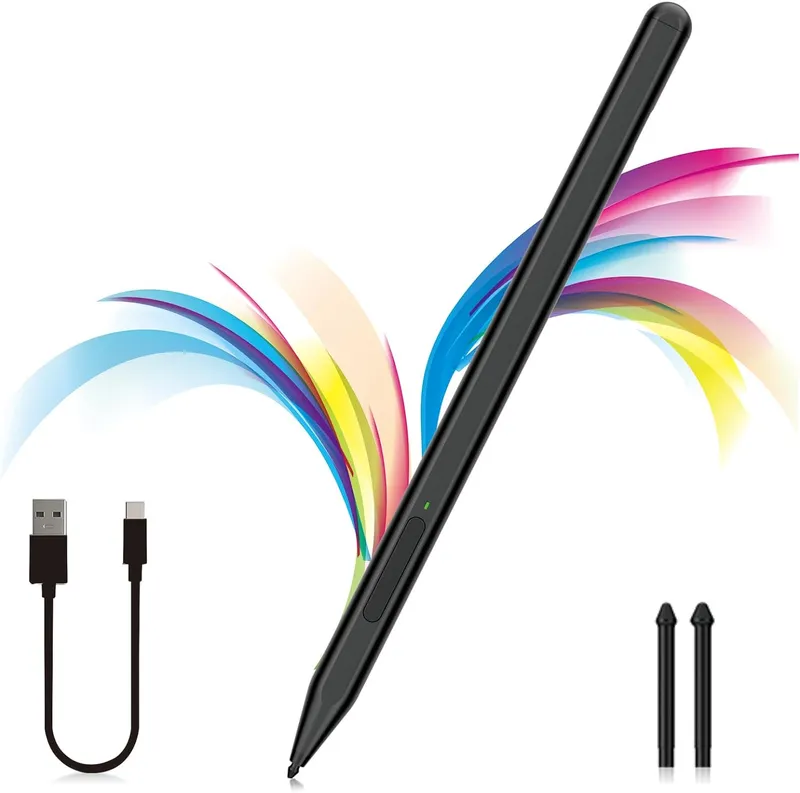
Milikilo Stylus Pen For Microsoft Surface Pro And Laptop Series Rechargeable Digital Pencil With Tilt Function Matte Black
Why you'll like it
- Natural Writing Experience — Palm rejection technology lets you rest your hand comfortably on the screen without causing stray marks or hand fatigue
- Precise Artistic Control — Advanced tilt sensitivity and 1024 pressure points allow you to shade and draw clean lines of varying thickness
- Enhanced Work Efficiency — Integrated side buttons provide instant right-click and eraser functions without disrupting your workflow
- Long Battery Life — Fast Type-C charging fuels the stylus fully in just forty minutes to deliver eighty hours of continuous creative use
- Secure Magnetic Attachment — Dual internal magnets snap firmly onto your tablet frame so your pen remains safely attached and ready
Product details
Description
The Milikilo F97 Stylus Pen offers an exceptional digital writing and drawing experience for Microsoft Surface users in India. Designed to mimic the natural feel of pen on paper, this premium accessory boasts 1024 levels of pressure sensitivity alongside advanced tilt functionality, making it perfect for detailed sketching, shading, and note-taking.
The built-in palm rejection technology ensures you can rest your hand comfortably on the screen without triggering accidental inputs. Crafted with a sleek matte black finish, the stylus features a smart dual-button design for seamless eraser and right-click navigation.
With an incredibly efficient Type-C fast-charging battery, a quick forty-minute charge provides up to eighty hours of active use, while the ten-minute automatic sleep mode maximizes standby time. Dual integrated magnets allow the pen to snap securely to the side of your compatible tablet, ensuring your digital pencil is always within reach when inspiration strikes.
How to use
- To turn the stylus on, long press the upper button until the indicator light shines green, allowing you to use it directly on your device without any Bluetooth pairing.
- To turn the pen off, or when left idle for ten minutes, the device will automatically enter sleep mode to preserve battery life.
- Swap the pen tip whenever necessary by gently pulling out the existing nib and inserting one of the provided replacement tips.
Ingredients
Polycarbonate exterior, gold-plated internal nib assembly, lithium-ion rechargeable battery, and neodymium magnets.
As printed by the brand. Check the pack label if you have an allergy.
Specifications
| Brand | Milikilo |
|---|---|
| Ships from | USA (sourced directly), checked in Navi Mumbai |
| Sold by | Dropy.in |
Ratings & reviews
From our customers
Top reviews first: highest rated, with photos first
- Deepak V.5 ★
box crushed but works fine
outer parcel box was totally battered when delivered so got worried, but stylus inside was safe with extra nibs intact. writes well on my surface go.
- Pranita D.5 ★
navryasathi ghetla khup avadla
husband chya surface laptop sathi gift kela hota. notes lihayla ekdum smooth ahe n side cha eraser button khup useful vatla tyana.
- Arjun S.5 ★
second time buying this
bought again because i lost the previous one during travel. works just like the first one, magnetic hold on the side of my surface pro is solid and palm rejection never glitches during office calls.
- Rohan M.4 ★
kaafi sahi pencil hai
was testing it properly for my sketches on surface book. tilt function shading ke liye mast kaam karta hai aur type c se fast charge ho jata hai bas 1024 pressure levels hai toh official slim pen jaisa ultra subtle touch expect mat karo. overall good 👌
FAQs
Can I use a non-kobo stylus with Kobo Libra colour?
This specific digital stylus is engineered exclusively for Microsoft Surface protocols and will not function optimally with independent e-reader brands like Kobo. It is recommended to use this pen only with the verified Microsoft device compatibility list.
Does this pen require a Bluetooth connection to work with my tablet?
No, this stylus operates entirely without a Bluetooth connection. You simply need to power on the pen by pressing the upper button, and it will interact with your screen immediately.
Is this stylus compatible with the Surface Laptop Go series?
No, this stylus is not compatible with the Surface Laptop Go, Laptop Go 2, or Laptop Go 3 models. It is designed for standard Surface Pro, Surface Laptop, Surface Go tablets, and Surface Studio models.
Is this Milikilo stylus pen an authentic USA import available in India?
Yes, this is an authentic Milikilo product imported directly from the USA. Dropy sources these premium electronics directly from trusted global channels to ensure Indian consumers receive genuine international inventory.
How do I know if the stylus needs to be charged?
If the pen fails to turn green upon pressing the power button or stops responding to the screen, connect the included Type-C cable to a power source. A complete charge takes only forty minutes.
How long will delivery take?
Most orders arrive in 15–20 days: we source each product directly from the USA, check it at our Navi Mumbai warehouse and pack it on video. Items marked Dropy Express ship from our India warehouse and arrive in 3–5 days.
Is cash on delivery available?
Full cash on delivery is available all over India on Dropy Express items. For other orders from ₹2,499 to ₹15,000 you can use Partial COD: pay 25% online now and the rest in cash on delivery.
Are your products genuine?
Yes. Every product is 100% authentic, sourced directly from the USA, quality-checked and packed on video at our Navi Mumbai warehouse.
What if my order arrives damaged or wrong?
Write to us at [email protected] as soon as it arrives. Damaged, wrong or not as described, our Buyer Protection gives you a full refund. The details are in our Return, Refund & Cancellation Policy.
Is delivery free?
Delivery is free on orders from ₹1,499. Below that a ₹79 delivery fee applies.