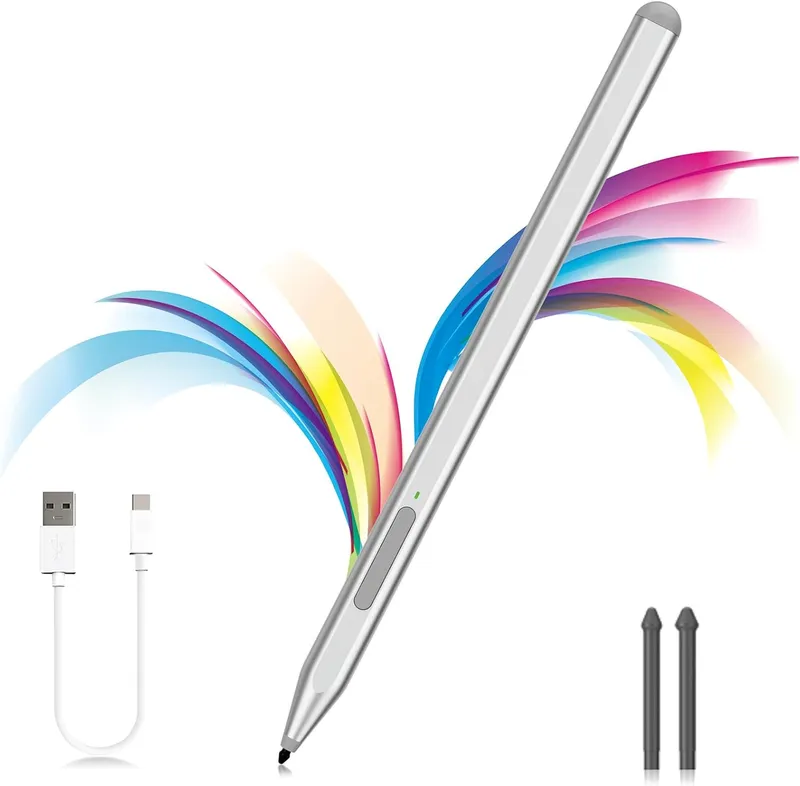
Milikilo Stylus Pen For Microsoft Surface Pro And Laptop With Eraser Side Button Palm Rejection And Tilt Function Silver
Why you'll like it
- Enhanced Precision — The gold-plated CNC nib features one thousand twenty-four pressure points for highly accurate strokes and natural handwriting
- Seamless Workflow — Integrated side buttons provide instant right-click and eraser functionality to streamline your navigation
- Natural Drawing Feel — Built-in tilt support automatically adjusts line thickness at larger angles for authentic sketching and shading
- Comfortable Interaction — Advanced palm rejection technology allows you to rest your hand freely on the screen while working
- Fast Charging Power — The advanced Type-C rapid charging system provides eighty hours of continuous usage from a quick forty-minute charge
Product details
Description
The Milikilo Stylus Pen is a premium input solution designed for digital creators, students, and professionals using Microsoft Surface devices. Engineered with advanced palm rejection technology, it allows you to rest your hand naturally on the screen without leaving unwanted marks, ensuring an uninterrupted and fluid workflow.
Featuring dynamic tilt functionality, this stylus mimics the feel of a traditional pencil by thickening lines when angled, making it an exceptional tool for precise sketching, shading, and technical drawing. The integration of dual side functional buttons provides a streamlined user experience, placing right-click and quick-erase actions directly at your fingertips.
With an aluminum-alloy body featuring flat edges, it provides an ergonomic grip while preventing the pen from rolling off desks. The gold-plated CNC nib ensures stable connection and ultra-smooth line delivery, making it the perfect upgrade for taking notes, editing documents, or creating digital art.
How to use
- Ensure the stylus is charged using the included Type-C cable.
- Turn on your Microsoft Surface device; no Bluetooth pairing is required as the pen connects automatically via Microsoft Pen Protocol.
- Use the lower side button to erase mistakes and the upper side button to right-click.
- Rest your hand comfortably on the screen while writing or drawing.
Ingredients
Premium aluminum-alloy body, CNC machined gold-plated internal components, electronic circuit boards, Type-C charging port, and lithium-ion rechargeable battery.
As printed by the brand. Check the pack label if you have an allergy.
Specifications
| Brand | Milikilo |
|---|---|
| Ships from | USA (sourced directly), checked in Navi Mumbai |
| Sold by | Dropy.in |
Ratings & reviews
From our customers
FAQs
What pen is compatible with Surface Pro 11?
The Milikilo Stylus Pen is fully compatible with the Microsoft Surface Pro 11, utilizing the Microsoft Pen Protocol to deliver precise inputs. It works seamlessly out of the box without requiring manual Bluetooth setup. Please note it is not compatible with the Surface Laptop Go series.
What can I use as a stylus for my Surface Pro?
You can use a Microsoft Pen Protocol certified partner stylus like the Milikilo F97 pen. It offers advanced features such as palm rejection, tilt functionality, and dual command buttons that match original equipment performance. This provides an efficient alternative for drawing, writing, and navigation.
Is a stylus pen worth buying?
Yes, a high-quality stylus pen is highly beneficial for anyone looking to sign documents, take handwritten notes, or create digital artwork. It enhances precision and productivity far beyond standard touchscreen finger inputs. Features like pressure sensitivity make the digital experience feel completely natural.
Is this Milikilo product authentic and available in India?
Yes, this is an authentic Milikilo product imported directly from the USA. Dropy India ensures that all imported tech accessories are sourced directly from verified channels, guaranteeing genuine quality and reliable performance for Indian consumers.
How do you charge the Milikilo stylus pen?
The stylus pen charges quickly via its integrated Type-C port using the included USB-C cable. A full charge takes approximately forty minutes and provides up to eighty hours of active battery life. The pen also enters an automatic sleep mode after ten minutes of inactivity to preserve power.
How long will delivery take?
Most orders arrive in 15–20 days: we source each product directly from the USA, check it at our Navi Mumbai warehouse and pack it on video. Items marked Dropy Express ship from our India warehouse and arrive in 3–5 days.
Is cash on delivery available?
Full cash on delivery is available all over India on Dropy Express items. For other orders from ₹2,499 to ₹15,000 you can use Partial COD: pay 25% online now and the rest in cash on delivery.
Are your products genuine?
Yes. Every product is 100% authentic, sourced directly from the USA, quality-checked and packed on video at our Navi Mumbai warehouse.
What if my order arrives damaged or wrong?
Write to us at [email protected] as soon as it arrives. Damaged, wrong or not as described, our Buyer Protection gives you a full refund. The details are in our Return, Refund & Cancellation Policy.
Is delivery free?
Delivery is free on orders from ₹1,499. Below that a ₹79 delivery fee applies.