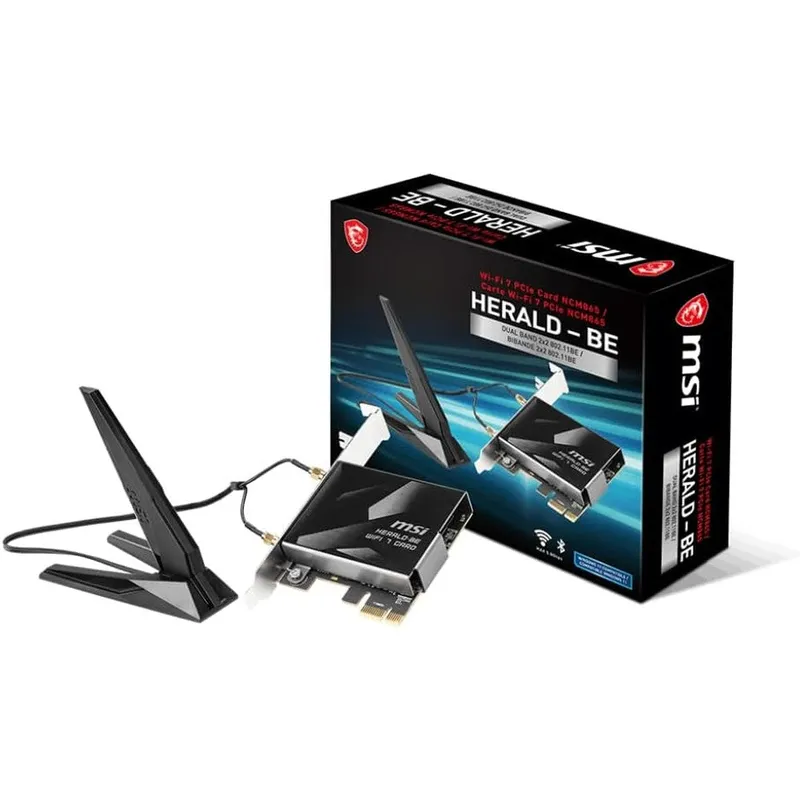
MSI Herald-BE Wi-Fi 7 MAX Wireless PCIe Adapter Featuring Bluetooth 5.4 Multi-Link Operation And External Magnetic Antenna Base
Why you'll like it
- Blazing Transfer Speeds — Experience up to 5.8 Gbps throughput using the advanced Qualcomm NCM865 Wi-Fi 7 module
- Maximum Bandwidth Efficiency — Unlock ultra-wide 320 MHz channels on the 6 GHz band to eliminate network congestion
- Enhanced Data Density — Transition from 1024-QAM to 4096-QAM modulation for faster and more efficient data transfers
- Lag-Free Performance — Multi-Link Operation technology combines multiple bands simultaneously to drastically reduce latency
- Superior Signal Coverage — Adjustable magnetic external antenna base enables ideal placement for optimal desktop reception
Product details
Description
The MSI Herald-BE Wi-Fi 7 MAX PCIe network card brings next-generation connectivity straight to your desktop computer. Built with the cutting-edge Qualcomm NCM865 chipset, this tri-band wireless adapter delivers blazing data transfer speeds of up to 5.8 Gbps, making it an essential upgrade for power users, competitive gamers, and creators who require ultra-low latency.
By utilizing wide 320 MHz channels on the 6 GHz band and an advanced 4096-QAM modulation scheme, it ensures massive data density and seamless network capacity that is up to five times greater than previous Wi-Fi 6 technology. This premium hardware expansion also equips your system with the latest Bluetooth 5.4 standard for stable, extended-range peripheral connections.
Designed for seamless integration into standard motherboard setups, it includes a high-performance external magnetic antenna base that allows you to optimize signal placement for the ultimate internet experience.
How to use
- Power off your desktop PC and unplug the power cable.
- Open the computer case to access the motherboard.
- Locate an available PCIe slot and firmly insert the MSI Herald-BE card into the slot, securing it with the case screw.
- Connect the included internal USB cable from the card to an open USB 2.0 pin header on your motherboard to enable Bluetooth functionality.
- Attach the external antenna to the rear bracket, place the magnetic base in an optimal location, close your PC case, power it on, and install the latest Windows 11 drivers.
Ingredients
High-grade fiberglass printed circuit board, premium electronic surface-mount components, integrated Qualcomm NCM865 wireless chipset, gold-plated PCIe x1 connector pins, brushed aluminum thermal heatsink, magnetic plastic external antenna housing, and high-conductivity copper internal shielding.
As printed by the brand. Check the pack label if you have an allergy.
Specifications
| Brand | msi |
|---|---|
| UPC | 824142377352 |
| Ships from | USA (sourced directly), checked in Navi Mumbai |
| Sold by | Dropy.in |
Ratings & reviews
From our customers
FAQs
Are you running Windows 11?
Yes, this premium wireless adapter is optimized specifically for Windows 11 to fully leverage the advanced multi-band capabilities of Wi-Fi 7 technology.
Do you have an open PCIe slot available?
This network card requires a vacant PCI Express slot on your motherboard. It is designed to fit easily into standard desktop configurations.
Why is my Bluetooth not working after installing the card?
For Bluetooth functionality to be recognized by your operating system, you must connect the included USB cable from the network card directly to an open USB header on your motherboard.
Is this product an authentic USA import available in India?
Yes, this is a fully authentic USA import sourced directly from authorized global supply chains. Dropy India ensures that Indian tech enthusiasts receive genuine, premium international PC hardware components.
Does this card include the necessary installation accessories?
The package comes complete with the tri-band PCIe expansion card, the high-gain external magnetic antenna base, an internal motherboard USB link cable, and an installation guide.
How long will delivery take?
Most orders arrive in 15–20 days: we source each product directly from the USA, check it at our Navi Mumbai warehouse and pack it on video. Items marked Dropy Express ship from our India warehouse and arrive in 3–5 days.
Is cash on delivery available?
Full cash on delivery is available all over India on Dropy Express items. For other orders from ₹2,499 to ₹15,000 you can use Partial COD: pay 25% online now and the rest in cash on delivery.
Are your products genuine?
Yes. Every product is 100% authentic, sourced directly from the USA, quality-checked and packed on video at our Navi Mumbai warehouse.
What if my order arrives damaged or wrong?
Write to us at [email protected] as soon as it arrives. Damaged, wrong or not as described, our Buyer Protection gives you a full refund. The details are in our Return, Refund & Cancellation Policy.
Is delivery free?
Delivery is free on orders from ₹1,499. Below that a ₹79 delivery fee applies.