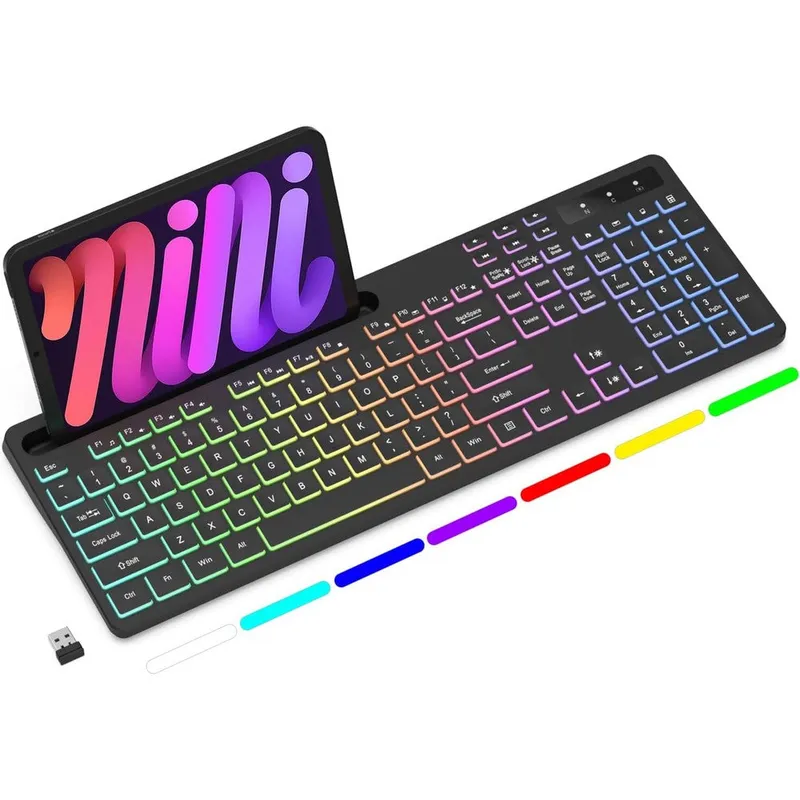
Soueto Wireless Keyboard With 7-Color RGB Backlit Full-Size Computer Keyboard With Phone Tablet Holder And Built-In Rechargeable Battery Black
Why you'll like it
- Enhanced Desktop Organization — The integrated 8.7-inch device slot holds your smartphone or tablet securely to maximize your workspace
- Vibrant Visual Aesthetics — Customizable 7-color RGB backlighting with four distinct lighting modes lets you customize your typing environment
- Ultra-Quiet Tactile Typing — Responsive soft-touch keys deliver a smooth, silent typing feedback that minimizes distraction during work or gaming
- Hassle-Free Power Management — Built-in 1500mAh rechargeable lithium-ion battery eliminates the need for frequent disposable battery replacements
- Seamless Wireless Connectivity — High-speed 2.4G RF technology provides a strong and stable connection using one simple plug-and-play USB dongle
Product details
Description
The Soueto Wireless Keyboard redefines your daily typing experience by blending vibrant aesthetics with practical utility. Featuring a stunning 7-color RGB backlight with four adjustable lighting modes and variable brightness levels, this full-size computer keyboard creates the perfect visual atmosphere for low-light work or late-night gaming sessions. A built-in 8.7-inch device cradle securely holds your smartphone or tablet at an ideal viewing angle, helping you multi-task efficiently while keeping your desk organized.
Engineered for comfort and productivity, the keyboard features soft-touch, responsive tactile switches that deliver a smooth and quiet typing experience. This makes it an excellent choice for shared office spaces or home setups where loud clicking is a distraction. Its comprehensive full-size layout includes dedicated multimedia hotkeys and shortcut navigation, allowing you to execute commands with minimal effort. This USA-imported premium accessory connects seamlessly via a strong, lag-free 2.4G wireless RF connection using a single USB receiver, ensuring steady performance across Windows and Mac platforms without complex software installation.
How to use
- To connect your keyboard, first plug the included 2.4G USB receiver directly into an available USB port on your computer.
- Turn on the power switch located on the keyboard.
- For backlight adjustments, press the Fn + PrtSc keys to toggle the light on or off, press Fn + Scroll Lock to cycle through the four light modes, and use Fn + Page Up or Page Down to modify brightness.
- Note: If you experience connection loss, turn on the keyboard power, hold the Esc + = keys together for 5 seconds, release them, and re-insert the USB receiver to complete the automatic pairing process.
Ingredients
High-grade ABS thermoplastic polymer enclosure, multi-layer coated keycaps, integrated lithium-ion polymer rechargeable battery cell, copper-plated dual-layer printed circuit board components, and premium silicone dome switch elements.
As printed by the brand. Check the pack label if you have an allergy.
Specifications
| Brand | Soueto |
|---|---|
| Category | Keyboards |
| EAN | 6932391932346 |
| Ships from | USA (sourced directly), checked in Navi Mumbai |
| Sold by | Dropy.in |
Ratings & reviews
From our customers
No reviews yetBe the first to review this product.
Customers Also Bought
View all
OMOTON
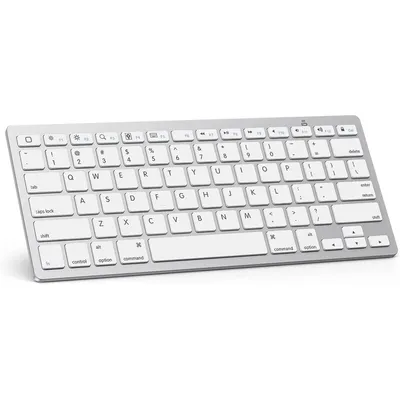
Omoton Ultra Slim Bluetooth Keyboard For Ipad Air Pro Mini And Ios Devices White
₹3,219
₹3,90017% off
FAQs
How do I activate the light on a keyboard?
To turn on and adjust the backlighting on the Soueto wireless keyboard, turn on the main power button and press the Fn and PrtSc keys simultaneously. You can then cycle through the four distinct lighting modes by pressing the Fn and Scroll Lock keys together.
What should I do if the keyboard backlight shuts off immediately after turning it on?
This is a standard battery-saving feature and not a product defect. The keyboard backlight automatically turns off within 1 to 2 seconds if it does not detect an active 2.4G signal. Make sure the USB receiver is securely plugged into your computer before testing the lights.
How do I re-pair the keyboard with its USB receiver?
Turn on the keyboard power switch, then press and hold the Esc and = keys together for 5 seconds before releasing them. Immediately insert the USB receiver into your computer port, and the NUM indicator light will illuminate steadily to show pairing is complete.
Is this Soueto wireless keyboard an authentic imported product available in India?
Yes, this is a one hundred percent genuine Soueto product imported directly from the USA. Dropy India sources all personal care, health, and electronics stock directly from authorized distributors in the United States to guarantee authenticity for Indian buyers.
Can this full-size keyboard be used with both Windows and Mac systems?
Yes, the keyboard is designed with universal compatibility in mind. It works seamlessly across Windows and Mac operating systems using the standard 2.4G USB wireless receiver plug-and-play setup.
How long will delivery take?
Most orders arrive in 15–20 days: we source each product directly from the USA, check it at our Navi Mumbai warehouse and pack it on video. Items marked Dropy Express ship from our India warehouse and arrive in 3–5 days.
Is cash on delivery available?
Full cash on delivery is available all over India on Dropy Express items. For other orders from ₹2,499 to ₹15,000 you can use Partial COD: pay 25% online now and the rest in cash on delivery.
Are your products genuine?
Yes. Every product is 100% authentic, sourced directly from the USA, quality-checked and packed on video at our Navi Mumbai warehouse.
What if my order arrives damaged or wrong?
Write to us at [email protected] as soon as it arrives. Damaged, wrong or not as described, our Buyer Protection gives you a full refund. The details are in our Return, Refund & Cancellation Policy.
Is delivery free?
Delivery is free on orders from ₹1,499. Below that a ₹79 delivery fee applies.