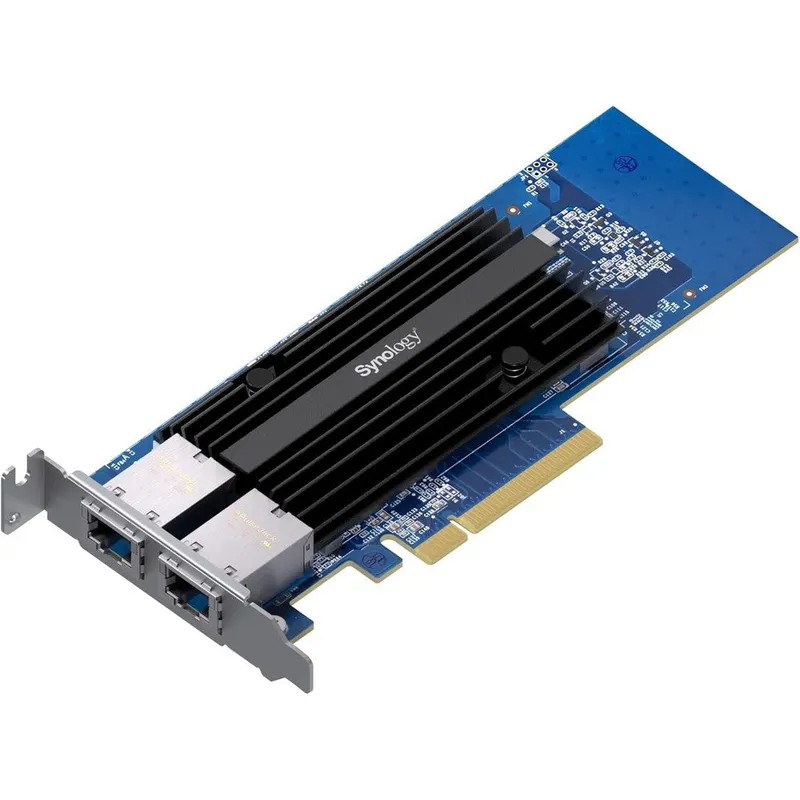
Synology 2-Port 10GbE RJ-45 PCIe Network Adapter E10G30-T2 High-Performance Dual-Port Expansion Card for Storage Server Networks
Why you'll like it
- Accelerated Throughput — Dual 10GbE RJ-45 ports can be combined using link aggregation to unleash transmission speeds up to 20 Gigabits per second
- Smart Network Backwards Compatibility — Built-in automatic negotiation handles data transfers smoothly across 10 Gbps, 1 Gbps, and 100 Mbps environments
- Enhanced System Efficiency — Integrated CPU offloading technologies reduce network processing strain to maintain peak storage application responsiveness
- Professional Network Redundancy — Dual-port architecture supports seamless port failover and balanced data distribution to minimize unexpected operational downtime
Product details
Description
The Synology E10G30-T2 dual-port 10GbE network adapter is engineered to significantly accelerate the network performance of compatible Synology systems. This premium add-in card is an exceptional choice for modern enterprises and professional workflows that require supporting an expanding user base across demanding operations like high-volume backups, video post-production, multi-tenant virtualization, and other bandwidth-intensive storage applications.
Equipped with dual 10 Gigabit Ethernet RJ-45 ports, it delivers remarkable throughput and robust redundancy. When combined into a single Link Aggregation Group, these two ports boost total network transmission speeds up to 20 Gigabits per second, while simultaneously providing active port failover and automated load balancing to prevent network downtime.
Designed for seamless system integration, the card utilizes a PCIe Gen3 x8 interface to extract maximum bandwidth from the host infrastructure. To further optimize overall system efficiency, this network interface card integrates advanced network processing offload technologies like Generic Segmentation Offload and TCP Segmentation Offload, allowing your system processor to focus resources on core computing tasks.
Bring genuine USA-imported networking hardware reliability directly to your Indian server setup for an uncompromised, professional-grade infrastructure upgrade.
How to use
- Ensure your Synology network attached storage device is running Synology DiskStation Manager 7.1.1-42962 Update 5 or a later version.
- Power down the storage system completely and disconnect all attached cables.
- Open the system chassis and locate an available PCIe Gen3 x8 expansion slot.
- Insert the E10G30-T2 network adapter card firmly into the expansion slot until properly seated, and secure the bracket with the mounting screw.
- Close the chassis, reconnect the data and power cables, and boot the system.
- Configure the newly added ports and establish link aggregation options directly through the storage operating system control panel.
Ingredients
High-density multilayer printed circuit board, low-profile and full-height steel brackets, dual RJ-45 ports with integrated LED link indicators, PCIe Gen3 x8 gold-plated interface connectors, generic and TCP segmentation offload microcontrollers.
As printed by the brand. Check the pack label if you have an allergy.
Specifications
| Brand | Synology |
|---|---|
| UPC | 846504004812 |
| Ships from | USA (sourced directly), checked in Navi Mumbai |
| Sold by | Dropy.in |
Ratings & reviews
From our customers
FAQs
What specific Synology NAS model do you have?
The Synology E10G30-T2 PCIe adapter requires a compatible system with an available PCIe expansion slot. Please consult the official Synology Hardware Compatibility List for your specific network attached storage model before installation.
Do you have 10GbE switches or cabling (Cat6/Cat7) ready to support it?
To take full advantage of 10GbE network speeds, you will need Category 6 (Cat6) copper cables for distances up to 55 meters, or Category 6A (Cat6A) and Category 7 (Cat7) cables for up to 100 meters, paired with a matching 10GbE switch.
Does this adapter card support automatic negotiation for slower network speeds?
Yes, this network card naturally features automatic negotiation capabilities. It dynamically switches between 10 Gbps, 1 Gbps, and 100 Mbps speeds depending on the maximum capacity of your connected switch or hardware.
Is this network adapter available as an authentic USA import in India?
Yes, this item is a genuine USA-imported product. Dropy India sources these specialized networking components directly from reliable vendors in the United States to guarantee complete authenticity for your enterprise.
What operating system software version is required for this card to function?
This PCIe expansion card requires your compatible Synology system to be updated to DiskStation Manager (DSM) version 7.1.1-42962 Update 5 or an updated variation to register and operate the dual ports properly.
How long will delivery take?
Most orders arrive in 15–20 days: we source each product directly from the USA, check it at our Navi Mumbai warehouse and pack it on video. Items marked Dropy Express ship from our India warehouse and arrive in 3–5 days.
Is cash on delivery available?
Full cash on delivery is available all over India on Dropy Express items. For other orders from ₹2,499 to ₹15,000 you can use Partial COD: pay 25% online now and the rest in cash on delivery.
Are your products genuine?
Yes. Every product is 100% authentic, sourced directly from the USA, quality-checked and packed on video at our Navi Mumbai warehouse.
What if my order arrives damaged or wrong?
Write to us at [email protected] as soon as it arrives. Damaged, wrong or not as described, our Buyer Protection gives you a full refund. The details are in our Return, Refund & Cancellation Policy.
Is delivery free?
Delivery is free on orders from ₹1,499. Below that a ₹79 delivery fee applies.