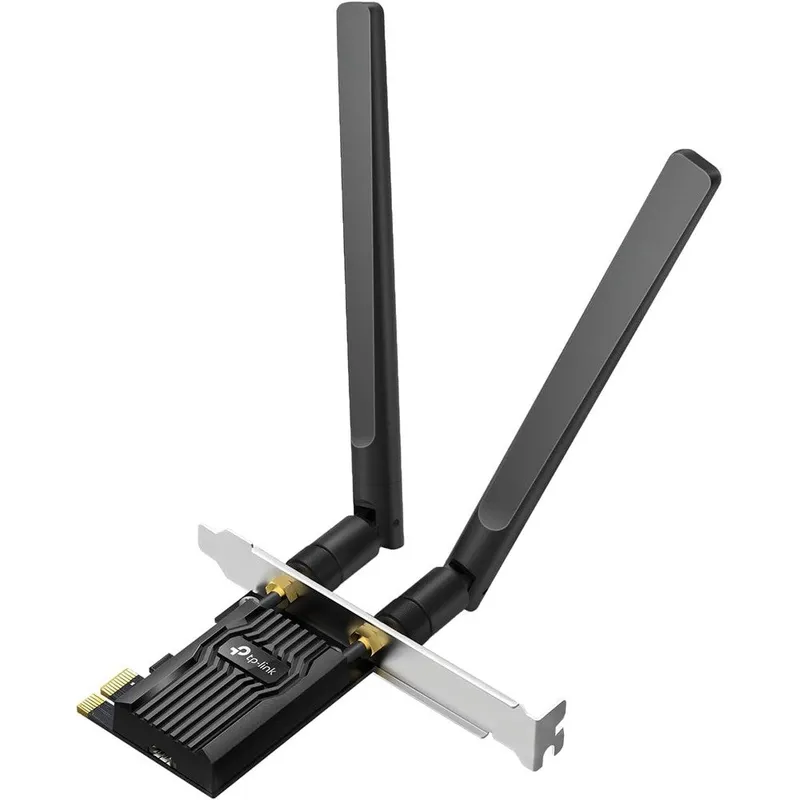
TP-Link Archer TX20E AX1800 Dual Band Wireless Wi-Fi 6 PCIe Adapter For Desktop PC With Bluetooth 5.2 And WPA3 Security Protocol
Why you'll like it
- Ultra-Fast Connectivity — Wi-Fi 6 technology reaches speeds up to 1.8 Gbps with 1201 Mbps on the 5 GHz band for smooth 4K streaming and quick downloads
- Lag-Free Gaming — OFDMA and MU-MIMO infrastructure reduces latency to deliver highly responsive real-time multiplayer gaming experiences
- Extended Range — Two powerful high-gain external antennas boost signal reception for reliable coverage even when your PC is far from the router
- Seamless Device Pairing — Bluetooth 5.2 technology provides faster data transfer speeds and wider coverage for wireless controllers and headphones
- Flexible Desktop Installation — Standard and low-profile brackets are included to fit both full-sized rigs and mini tower computer cases
Product details
Description
The TP-Link Archer TX20E AX1800 Wi-Fi 6 Bluetooth 5.2 PCIe Adapter is designed to liberate your desktop PC from messy cables and maximize online performance. Engineered for demanding internet tasks, this advanced wireless adapter utilizes the powerful Wi-Fi 6 foundation to deliver speeds up to 1.8 Gbps across dual bands, providing 1201 Mbps on the 5 GHz band and 574 Mbps on the 2.4 GHz band.
Perfect for enthusiast gamers, remote professionals, and content creators, it ensures smooth online gaming, immersive virtual reality experiences, and uninterrupted high-definition streaming. Equipped with cutting-edge Intel Wi-Fi 6 chipset technology, the card minimizes network congestion through MU-MIMO and OFDMA systems, significantly lowering latency for real-time responsiveness.
Additionally, the integrated Bluetooth 5.2 technology offers twice the speed and four times the coverage of older standards, allowing you to seamlessly pair wireless controllers, headphones, and keyboards. Safely imported to upgrade your home network infrastructure, this premium adapter features robust WPA3 network encryption to safeguard your data from external security threats.
How to use
- Turn off your desktop computer, unplug the power cable, and open the PC case.
- Locate an available PCIe slot on your motherboard and gently insert the TP-Link Archer TX20E card until it clicks securely into place.
- Connect the included Bluetooth USB cable from the adapter to an open F_USB header on your motherboard to enable Bluetooth functionality.
- Fasten the bracket with a screw, close your PC case, reattach the power, and screw the two high-gain antennas onto the back panel.
- Power on your computer and install the latest official Windows 11 or Windows 10 64-bit drivers from the manufacturer website to start browsing.
Ingredients
High-conductivity circuit board, premium internal chipsets, gold-plated PCIe connectors, heavy-duty metallic low-profile and standard brackets, dual-band high-gain omnidirectional external antennas, insulated internal Bluetooth USB connection cable.
As printed by the brand. Check the pack label if you have an allergy.
Specifications
| Brand | TP-Link |
|---|---|
| UPC | 840030708800 |
| Ships from | USA (sourced directly), checked in Navi Mumbai |
| Sold by | Dropy.in |
Ratings & reviews
From our customers
FAQs
What is a PCIe Wi-Fi card used for?
A PCIe Wi-Fi card is installed directly into a desktop motherboard slot to provide internal high-speed wireless internet and Bluetooth connectivity without relying on external USB dongles. This delivers a more stable connection, superior range via dedicated external antennas, and lower latency for gaming or heavy streaming.
Is AX1800 good for gaming?
Yes, AX1800 provides a highly capable Wi-Fi 6 connection that supports real-time online gaming. It combines dual-band speeds of up to 1201 Mbps on 5 GHz with advanced MU-MIMO and OFDMA technologies to minimize packet loss and lower ping latency on crowded networks.
Does this adapter support the latest Windows operating systems?
This network card is engineered specifically for modern desktop setups. It natively supports Windows 11 and Windows 10 64-bit operating systems to ensure maximum compatibility and regular driver updates.
Is this TP-Link Archer TX20E adapter an authentic imported model?
Yes, this product is an authentic import sourced directly from the USA. Dropy India ensures that Indian tech enthusiasts receive premium, genuine international electronics variants with original packaging and specifications.
Do I need to connect the internal cable for Wi-Fi to work?
No, the Wi-Fi functionality operates entirely through the motherboard's PCIe slot. However, you must connect the included internal USB cable to an open F_USB connector on your motherboard to utilize the Bluetooth 5.2 features.
How long will delivery take?
Most orders arrive in 15–20 days: we source each product directly from the USA, check it at our Navi Mumbai warehouse and pack it on video. Items marked Dropy Express ship from our India warehouse and arrive in 3–5 days.
Is cash on delivery available?
Full cash on delivery is available all over India on Dropy Express items. For other orders from ₹2,499 to ₹15,000 you can use Partial COD: pay 25% online now and the rest in cash on delivery.
Are your products genuine?
Yes. Every product is 100% authentic, sourced directly from the USA, quality-checked and packed on video at our Navi Mumbai warehouse.
What if my order arrives damaged or wrong?
Write to us at [email protected] as soon as it arrives. Damaged, wrong or not as described, our Buyer Protection gives you a full refund. The details are in our Return, Refund & Cancellation Policy.
Is delivery free?
Delivery is free on orders from ₹1,499. Below that a ₹79 delivery fee applies.