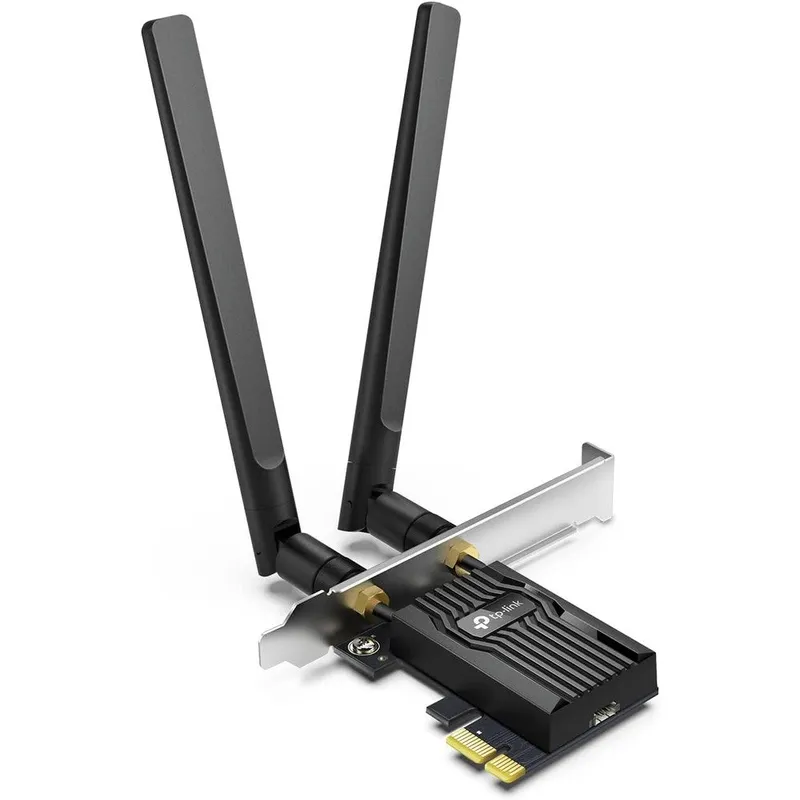
TP-Link WiFi 6 PCIe WiFi Card For Desktop PC AX3000 Archer TX55E Wireless Adapter With Bluetooth 5.2 And WPA3 Security Black
Why you'll like it
- Blazing Fast Speeds — Experience ultra-high-speed dual-band connectivity reaching up to 2402 Mbps on 5 GHz and 574 Mbps on 2.4 GHz for uninterrupted streaming and online gaming.
- Advanced Peripheral Support — Connect your favorite wireless devices seamlessly with built-in Bluetooth 5.2 technology ensuring wider coverage and faster transmission speeds.
- Minimized Network Lag — Benefit from revolutionary MU-MIMO and OFDMA technologies that reduce latency so your desktop can communicate with multiple devices simultaneously without performance drops.
- Enhanced Data Protection — Secure your private network and personal information with the latest WPA3 wireless encryption standard guarding against cyber threats.
- Reliable Thermal Design — Keep your system running cool under heavy processing loads with a custom black heat sink designed for optimal heat dissipation.
Product details
Description
The TP-Link Archer TX55E AX3000 PCIe WiFi Card is a high-performance internal wireless adapter designed to revolutionize your desktop PC connectivity. Built for gamers, streamers, and power users who demand flawless network performance, this network card introduces advanced Wi-Fi 6 technology directly to your motherboard.
By operating on both the 2.4 GHz and 5 GHz bands, it delivers astonishing wireless speeds up to 2402 Mbps on the higher frequency, ensuring smooth online gaming and seamless 4K video streaming. The integrated black heat sink effectively dissipates heat to maintain peak operational reliability during intense workloads, while two multi-directional external antennas optimize signal reception across your space.
Beyond networking, this adapter integrates Bluetooth 5.2 technology, allowing you to connect wireless peripherals like controllers, headphones, and keyboards with improved stability. Equipped with MU-MIMO and OFDMA capabilities, it efficiently handles crowded networks by reducing lag and latency, bringing a smooth online experience to your Windows desktop computer.
How to use
- Turn off your desktop computer, unplug the power cable, and open the PC case.
- Locate an available PCIe slot (X1, X4, X8, or X16) on your motherboard and firmly insert the TP-Link Archer TX55E network adapter card.
- Secure the bracket with a screw, then connect the included Bluetooth USB cable to a 9-pin USB header on your motherboard.
- Close the PC case, reattach the power cable, screw the two external multi-directional antennas onto the rear ports, and power on your desktop.
- Install the required network and Bluetooth drivers using the provided utility CD or download the latest official drivers from the TP-Link support website for Windows 11 or Windows 10 64-bit operating systems.
Ingredients
High-grade printed circuit board, aluminum passive heat sink, premium electronic microchip components, dual multi-directional external antennas, low-profile and full-height installation brackets.
As printed by the brand. Check the pack label if you have an allergy.
Specifications
| Brand | TP-Link |
|---|---|
| UPC | 840030707391 |
| Ships from | USA (sourced directly), checked in Navi Mumbai |
| Sold by | Dropy.in |
Ratings & reviews
From our customers
FAQs
How fast is the Archer TX55E?
The TP-Link Archer TX55E delivers exceptional dual-band Wi-Fi 6 speeds. It can reach up to 2402 Mbps on the 5 GHz band and up to 574 Mbps on the 2.4 GHz band, providing a total network bandwidth of 3000 Mbps.
Is TP-Link WiFi 6 AX3000 PCIe WiFi Card good?
Yes, it is highly rated for performance and reliability. It features premium components like a specialized heat sink for temperature management, MU-MIMO to reduce network congestion, and ultra-low latency for seamless gaming.
Is TP-Link AX3000 WiFi 6E?
No, the Archer TX55E AX3000 supports standard Wi-Fi 6 (802.11ax) dual-band connectivity. It operates on the 2.4 GHz and 5 GHz bands, whereas Wi-Fi 6E models include an additional 6 GHz band.
Is this TP-Link PCIe card available as an authentic USA import in India?
Yes, Dropy India sources this premium networking product directly from verified channels in the USA. Every purchase ensures a genuine, fully authentic imported unit delivered safely to your address in India.
How to install TP Link AX3000 WiFi 6?
Installation involves slotting the card into an open PCIe lane on your desktop motherboard and connecting the internal USB cable for Bluetooth functionality. Once physically installed, you simply complete the setup by running the driver installer on your Windows 10 or 11 64-bit operating system.
How long will delivery take?
Most orders arrive in 15–20 days: we source each product directly from the USA, check it at our Navi Mumbai warehouse and pack it on video. Items marked Dropy Express ship from our India warehouse and arrive in 3–5 days.
Is cash on delivery available?
Full cash on delivery is available all over India on Dropy Express items. For other orders from ₹2,499 to ₹15,000 you can use Partial COD: pay 25% online now and the rest in cash on delivery.
Are your products genuine?
Yes. Every product is 100% authentic, sourced directly from the USA, quality-checked and packed on video at our Navi Mumbai warehouse.
What if my order arrives damaged or wrong?
Write to us at [email protected] as soon as it arrives. Damaged, wrong or not as described, our Buyer Protection gives you a full refund. The details are in our Return, Refund & Cancellation Policy.
Is delivery free?
Delivery is free on orders from ₹1,499. Below that a ₹79 delivery fee applies.