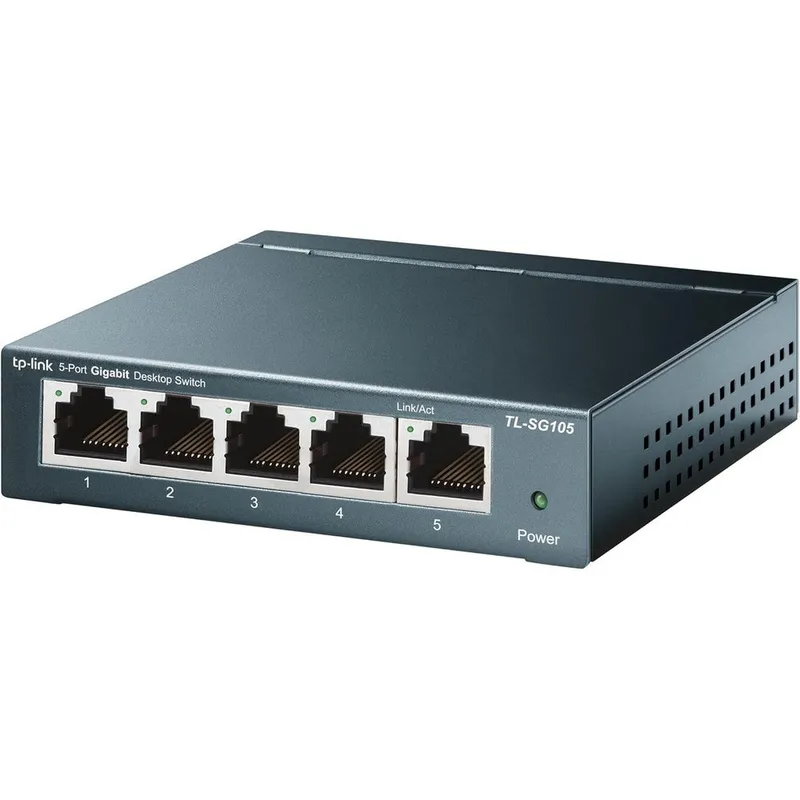
TP-Link TL-SG105 5 Port Gigabit Unmanaged Ethernet Switch Desktop Network Hub Splitter Shielded Ports Fanless Metal Design
Why you'll like it
- High Speed Connectivity — Five gigabit auto negotiation ports provide up to ten Gbps switching capacity for high bandwidth devices.
- Effortless Setup — Plug and play functionality requires zero configuration or software installation for immediate network expansion.
- Traffic Optimization — Built in quality of service and internet group management protocol snooping prioritize voice and video data.
- Durable Design — Compact steel housing with shielded ports ensures efficient heat dissipation and silent fanless operation.
- Energy Savings — Integrated green ethernet technology adjusts power usage automatically based on link status and cable length.
Product details
Description
The TP-Link TL-SG105 5 Port Gigabit Unmanaged Ethernet Switch provides an effortless way to expand your high-speed wired network at home or in the office. Designed for seamless connectivity, this desktop network hub features five 10/100/1000 Mbps auto-negotiation RJ45 ports that support Auto-MDI/MDIX, eliminating the need for complex crossover cables.
Whether you want to connect gaming consoles, smart televisions, or network-attached storage drives, this splitter delivers reliable bandwidth to all your devices. Engineered for performance and durability, this device is housed in a sturdy steel casing with shielded ports to minimize static interference and ensure excellent heat dissipation.
The fanless design guarantees completely silent operation, making it perfect for quiet workspaces or home entertainment setups. Packed with intelligent traffic optimization, it supports 802.1p/DSCP Quality of Service and IGMP Snooping to prioritize latency-sensitive applications like video streaming and voice calls.
Furthermore, it incorporates energy-efficient Green Ethernet technology, automatically adjusting power consumption based on link status and cable length to conserve up to 65% power without sacrificing performance. Enjoy a true plug-and-play experience with zero configuration required.
How to use
- 1.
- Connect the included power adapter to the switch and plug it into a power outlet. 2.
- Connect an Ethernet cable from your router to any port on the switch. 3.
- Connect your wired devices like computers, gaming consoles, or smart televisions to the remaining ports using Ethernet cables.
Ingredients
Steel, Copper, Plastic, Printed Circuit Board, Electronic Components.
As printed by the brand. Check the pack label if you have an allergy.
Specifications
| Brand | TP-Link |
|---|---|
| Ships from | USA (sourced directly), checked in Navi Mumbai |
| Sold by | Dropy.in |
Ratings & reviews
From our customers
Top reviews first: highest rated, with photos first
- Rodger5 ★
Ideal for resolving slow internet issues
Update in 2024:This review is originally from 2020. This little thing is still going strong and lovely. It's been moved several times as the home network has been changing and upgrading, and it keeps going. No complaints, just keeps working. Probably the most reliable piece of tech in my home network next to the UPS units I have for the machines. The original unit serves high demand steaming/upload download on the local network (NAS + servers in a proxmox setup). I have other units that service other parts of the home, and they work great.TLDR: If you have issues with Zoom, streaming services, or just overall spotty internet connection with your WiFi, you may want to consider getting the 5 port switch (not PoE! Save yourself some money) along with some CAT 6 cables (for gigabit internet). Unmanaged works fine for just 'plug and play'. It's insane how much it helps! You shouldn't have to do much besides plugging in everything and selecting the 'Ethernet' option on the device if it doesn't so automatically. They're reliable and easy to setup and use.The long story:I had purchased the PoE one at first to allow it to later be utilized for a security station if need be (or if I had something fun to play with), but I also got the unmanaged 5 port (without PoE) on accident. The one WITHOUT PoE is much smaller (3/4 the size it feels like). I would recommend the 5 or 8 port if you just have a few things you wish to plug in to it. PoE is not something you should worry about unless you know your devices require it. My household has issues with WiFi, so many devices can't connect well enough to have an enjoyable experience. WiFi extenders, a new router, etc, did not work for us in the past (and ended up causing many issues), so we resulted to using Ethernet for our most used devices. Our internet plan is top tier for our area, so we expected better connections. Turns out we just do a whole lot of internet stuff to bog down the main router and our bandwidth!The household setup:One switch (PoE 5 port, unmanaged) is at the router since the router only offers 2 Ethernet ports. This switch services a smart TV, computer, and free cable for whatever device we decide to plug in (be a laptop or game console). It also services another switch (5 port, unmanaged) across the house. That way we only have one Ethernet cable running across the house until we can put it under the house.The second switch services a WiFi station, computer, game console, and smart TV. The computer is on 24/7 and the TV is on a majority of the day and night streaming HD movies and shows from multiple services. All of these are fairly 'heavy' devices on this switch, as in they are constantly downloading or uploading content all waking hours of the day.All devices are connected with CAT 7 Ethernet cables, but CAT 6 work just fine. (I would recommend CAT 6 or CAT6a since it is certified to run gigabit. CAT 7 is overkill and I do not recommend it because of price and it's not standardized as much as the others).Results:So far everyone in the household has noticed an improvement not only with the devices plugged into the switches, but also the overall WiFi quality. Smart phones are no longer 'dropped', the printer remains connected, and even most laptops are seeing better speeds and responsiveness on the WiFi. My household is especially polluted with plug and play devices (such as Dropy Echos, Ring Cameras, wireless smart plugs, etc), and all of these seem more responsive now that we have gotten the 'heavy' loads off of the WiFi.The second switch that is piggybacking off of the first switch has no issues, and all devices are able to preform to their peak. Even though not all of them are gigabit, they seem to greatly benefit from being on Ethernet. Zoom calls are much better too. Before we could only have 1 person on zoom but now everyone can get on so long as only one person is on WiFi.The switches do not heat too much and are easily concealable, but require power. I do not recommend stuffing them into a blanket closet or among pillows though, even though it's tempting to hide their flashing lights.Overall they have exceeded my expectations. This review will be updated in the future if any issues arise.
- Mark A.5 ★
Rapid & Uncomplicated-To-Apply!
Edit 11/21/2025:I periodically like to perform check-ins on my previous reviews. Over 3 years later I am happy to say this thing still works flawlessly. Haven't encountered a single hiccup. Very consumer friendly and is truly "set it and forget it".-----------------First off I need to mention that Dropy asked me to rate 3 "features": 'WiFi signal', 'Tech Support', and the 'User Interface'. Let me be clear that this device does not use WiFi and it does not have it's own local IP address to let you log into a "User Interface". Just wanted to point this out in case you come across other reviews that have these two "features" rated that could be misleading you.I recently built a house and had it wired for Cat 6 Ethernet, with there being 1 wall port in each room. One room in particular I have a desktop PC and an Xbox that I wanted both to have a wired internet connection to which is what required the purchase of this device. It is extremely easy to set up, and with it being "unmanaged", there was no portal I needed to sign into that would require me to mess with settings. It's a very simple "plug-and-play" set up, you simply need to connect an incoming ethernet cable from your router/modem (in any port) and then you can now share that internet connection to 4 other wired devices - that's all there is to it.One important note is this: if you have a modem-only device (these devices usually only have a single ethernet port on the back) then you are probably needing a router - not a switch. A router is capable of assigning your devices their own internal IP addresses via DHCP - which is important if you don't know how to assign them yourself. It's also what manages your NAT for situations your devices may need to use the same internet port number. While you don't necessarily need to know what all of this means, you need to understand that a switch is not a replacement for a router. If you are a consumer (as opposed to a business) then you're likely considering this switch to extend/add more ports than what your router has (they usually have around 4 or 5). Even the devices that are connected directly to this switch will still be getting their local IP addresses assigned from your router.The benefit of this switch over a "hub" is that it knows how to route your internet traffic to your devices. So even though it's not responsible for assigning IP addresses to your devices, it knows how to route specific traffic to the devices that require it. It does so lightning-fast - I notice absolutely no additional latency (which is great for gaming) and no compromise in speed either. If you're on the market for a small unmanaged switch, then this is an affordable and excellent choice... A hub, on the other hand, will route all traffic it receives to all devices that are connected to it (they do not 'switch' traffic to specific devices), which essentially requires the devices themselves to ignore the traffic it doesn't want. It adds additional overhead and can potentially cause dropped packets and they just essentially add additional network congestion. I could see a hub being used for something like printers or IoT devices where latency isn't critical, but I think it's ultimately beneficial to just not use them at all even though they might look similar to a switch.And as I've said above, this device does not contain WiFi. You cannot connect this wirelessly to any device. You would be able to purchase a separate device that would connect to this to transmit a wifi signal, but this will not do it on its own.
FAQs
What does a TP-Link TL-SG105 do?
The TP-Link TL-SG105 is an unmanaged ethernet switch that expands your wired network by adding more gigabit ports. It allows you to connect multiple high-speed devices like computers, gaming consoles, and smart televisions to your router using reliable wired connections.
What is the difference between TL-SG105 and TL-SG105E?
The TL-SG105 is a completely unmanaged plug-and-play switch requiring no setup. The TL-SG105E is an Easy Smart switch that offers basic management features such as network monitoring, traffic prioritization, and VLAN configuration.
What is the speed of TL-SG105 port?
Each of the five ports on the TL-SG105 supports gigabit speeds of 10/100/1000 Mbps with auto-negotiation. This ensures optimal data transfer rates depending on the capability of the connected device.
Is the TP-Link TL-SG105 available on Dropy India authentic?
Yes, the TP-Link TL-SG105 available on Dropy India is a fully authentic USA import. Dropy sources products directly from trusted distributors in the United States to ensure genuine quality for Indian consumers.
Does this ethernet splitter require any software setup?
No, this network switch is entirely plug-and-play. It requires no configuration, software installation, or IT expertise to set up and start using immediately.
How long will delivery take?
Most orders arrive in 15–20 days: we source each product directly from the USA, check it at our Navi Mumbai warehouse and pack it on video. Items marked Dropy Express ship from our India warehouse and arrive in 3–5 days.
Is cash on delivery available?
Full cash on delivery is available all over India on Dropy Express items. For other orders from ₹2,499 to ₹15,000 you can use Partial COD: pay 25% online now and the rest in cash on delivery.
Are your products genuine?
Yes. Every product is 100% authentic, sourced directly from the USA, quality-checked and packed on video at our Navi Mumbai warehouse.
What if my order arrives damaged or wrong?
Write to us at [email protected] as soon as it arrives. Damaged, wrong or not as described, our Buyer Protection gives you a full refund. The details are in our Return, Refund & Cancellation Policy.
Is delivery free?
Delivery is free on orders from ₹1,499. Below that a ₹79 delivery fee applies.