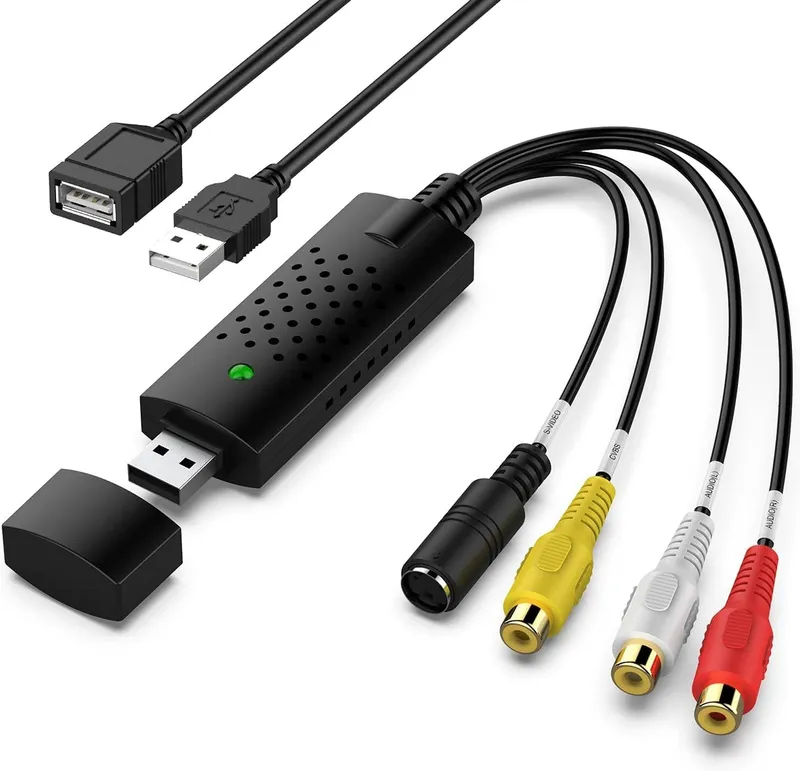
VIXLW USB Video Capture Card Device Analog RCA Composite To Digital Audio Video Converter Grabber For VHS VCR Hi8 Camcorder Support Windows And Mac
Why you'll like it
- Preserve Precious Memories — Digitizes analog home videos from classic VHS, VCR, Hi8, and Mini DV tapes into stable digital files on your computer
- Advanced Signal Processing — Converts analog RCA composite and S-Video inputs into high definition digital video with clear stereo audio
- Seamless Plug and Play Setup — Installs drivers automatically upon connection to a PC or Mac without requiring any external power source
- Universal System Compatibility — Works effortlessly with standard video formats like NTSC and PAL across current Windows and Mac OS platforms
- Open Source Software Friendly — Integrates smoothly with free recording software including OBS Studio, PotPlayer, and QuickTime Player for easy capturing
Product details
Description
The VIXLW USB Video Capture Card BR116 is the perfect solution for anyone looking to rescue their old memories from fading away on aging tapes. This compact analog-to-digital converter seamlessly bridges the gap between classic media players and modern technology.
It allows you to convert analog composite RCA or S-Video inputs from devices like VCRs, camcorders, Hi8, Mini DV, and DVD players into crisp digital files directly on your computer. Whether you want to preserve decades-old family functions, weddings, or childhood home videos, this device makes digitization accessible to everyone.
It features a straightforward plug-and-play USB 2.0 interface that automatically handles driver installation when connected to your PC or Mac. Operating on USB bus power, it requires no external power adapters.
The card utilizes advanced signal processing to convert video to a stable digital output with accurate colors and structural detail, capturing high-quality stereo sound without requiring an external sound card. It works flawlessly with popular, free open-source acquisition software such as OBS Studio, PotPlayer, and QuickTime Player.
How to use
- First, plug the VIXLW USB capture card into an available USB-A port on your computer.
- If you are using a newer computer with only USB-C ports, connect via a suitable adapter.
- Next, plug the color-coded RCA cables from your analog source device, such as a VCR or camcorder, into the corresponding red, white, and yellow inputs on the capture card, or use the S-Video port for enhanced video clarity.
- Download and open a free media acquisition software like OBS Studio or PotPlayer on Windows, or QuickTime Player on Mac.
- Within the software settings, select the capture card as your primary video and audio input source.
- Finally, press play on your tape player and click record inside the computer application to capture your digital file.
Ingredients
Polycarbonate housing, Gold-plated USB 2.0 interface connector, Copper-shielded analog RCA composite cable inputs (Yellow, White, Red), S-Video multi-pin mini-DIN connector, Integrated audio-video processing chipset, Internal PCB assembly.
As printed by the brand. Check the pack label if you have an allergy.
Specifications
| Brand | VIXLW |
|---|---|
| Category | Video Converters |
| UPC | 797427861900 |
| Ships from | USA (sourced directly), checked in Navi Mumbai |
| Sold by | Dropy.in |
Ratings & reviews
From our customers
No reviews yetBe the first to review this product.
Customers Also Bought
View all
FAQs
How do I use a USB capture card?
Connect the capture card to your computer's USB port, then link your analog player to the card using standard RCA or S-Video cables. Open a recommended recording software like OBS Studio, choose the USB device as your input, and hit record while playing your media.
What software should I use with the VIXLW capture card?
We highly recommend using free, reputable digital recording software. For Windows users, OBS Studio or PotPlayer works best, while Mac users can easily record using OBS Studio or the built-in QuickTime Player.
Why is my capture card not capturing video?
This usually happens if the input source settings in your capture software are not configured properly. Ensure that the VIXLW device is selected as the active video device in your software, check that all physical cables are firmly connected, and verify that your analog player is playing.
Is this VIXLW video capture card an authentic imported product in India?
Yes, this VIXLW capture card is an authentic product imported directly from the USA. Dropy India sources all items directly from reliable American distribution networks to guarantee genuine quality for Indian consumers.
Does this analog converter card require external power to work?
No, this device operates entirely on USB bus power. It draws all the energy it needs directly from your computer's USB port, eliminating the need for messy wall adapters or external power supply blocks.
How long will delivery take?
Most orders arrive in 15–20 days: we source each product directly from the USA, check it at our Navi Mumbai warehouse and pack it on video. Items marked Dropy Express ship from our India warehouse and arrive in 3–5 days.
Is cash on delivery available?
Full cash on delivery is available all over India on Dropy Express items. For other orders from ₹2,499 to ₹15,000 you can use Partial COD: pay 25% online now and the rest in cash on delivery.
Are your products genuine?
Yes. Every product is 100% authentic, sourced directly from the USA, quality-checked and packed on video at our Navi Mumbai warehouse.
What if my order arrives damaged or wrong?
Write to us at [email protected] as soon as it arrives. Damaged, wrong or not as described, our Buyer Protection gives you a full refund. The details are in our Return, Refund & Cancellation Policy.
Is delivery free?
Delivery is free on orders from ₹1,499. Below that a ₹79 delivery fee applies.